

You’re a small business owner, and in today’s digital landscape, your website isn’t just a brochure; it’s a vital extension of your brand, a customer service portal, and often, your primary sales channel. If your website is sluggish, cumbersome, or buggy, you’re not just annoying visitors; you’re actively losing potential customers and revenue. Maximizing your website’s performance isn’t a luxury; it’s a necessity for your survival and growth. This comprehensive guide will walk you through the essential steps to ensure your online presence is as fast, reliable, and effective as possible.
Before diving into the “how,” it’s crucial to grasp why website performance matters so profoundly for your small business. You might think a few extra seconds don’t make a huge difference, but data consistently proves otherwise.
The Impact on User Experience (UX)
First and foremost, slow websites deliver a terrible user experience. Imagine walking into a physical store where the doors are jammed, the aisles are cluttered, and the cashier is in slow motion. You’d likely leave, right? The same principle applies online.
- Patience is Finite: Users have increasingly short attention spans. Studies show that a two-second delay in load time can result in a significant increase in bounce rate – the percentage of visitors who leave your site after viewing only one page.
- Frustration Leads to Abandonment: If your pages take too long to load, visitors get frustrated and will often abandon your site for a faster competitor. They won’t wait around for your content to appear, no matter how valuable it is.
- Negative Brand Perception: A slow website reflects poorly on your business. It suggests a lack of professionalism, attention to detail, or investment in your online presence. This erodes trust and diminishes your brand’s credibility.
The Influence on Search Engine Optimization (SEO)
Google, and other search engines, prioritize fast-loading websites. This isn’t a secret; it’s a publicly acknowledged ranking factor.
- Core Web Vitals: Google’s Core Web Vitals are a set of metrics that measure real-world user experience for loading performance, interactivity, and visual stability. Sites that perform well on these metrics are rewarded with better search rankings.
- Crawl Budget Efficiency: Search engine crawlers have a “budget” for how many pages they can crawl on your site. If your pages are slow, crawlers spend more time on fewer pages, potentially missing valuable content and hindering your site’s indexation.
- Mobile-First Indexing: With more than half of all web traffic coming from mobile devices, Google primarily uses the mobile version of your content for indexing and ranking. A slow mobile site will severely impact your visibility.
The Effect on Conversion Rates and Revenue
Ultimately, a slow website costs you money. Every lost visitor is a lost opportunity for a sale, a lead, or an engagement.
- Lower Conversion Rates: Even a one-second delay can significantly decrease conversion rates. If your customers can’t quickly find what they’re looking for or complete a purchase, they’ll go elsewhere.
- Increased Cart Abandonment: For e-commerce sites, slow checkout processes are a major contributor to cart abandonment. Customers get frustrated and give up, leaving their potential purchases behind.
- Reduced Advertising ROI: If you’re running paid advertising campaigns (e.g., Google Ads, social media ads) to drive traffic to your site, a slow landing page means you’re paying for clicks that won’t convert, wasting your marketing budget.
To further enhance your understanding of website performance optimization for small businesses, you may find it beneficial to explore the article titled “8 Best Website Optimization Tips for 2023.” This resource provides valuable insights and actionable strategies that can complement your efforts in improving your website’s speed and efficiency. You can read the article by following this link: 8 Best Website Optimization Tips for 2023.
Benchmarking Your Current Performance
You can’t improve what you don’t measure. The first step in maximizing your website performance is understanding its current state. You need to identify your bottlenecks and establish a baseline against which you can measure future improvements.
Utilizing Performance Testing Tools
There are numerous free and paid tools available that provide detailed insights into your website’s speed and performance.
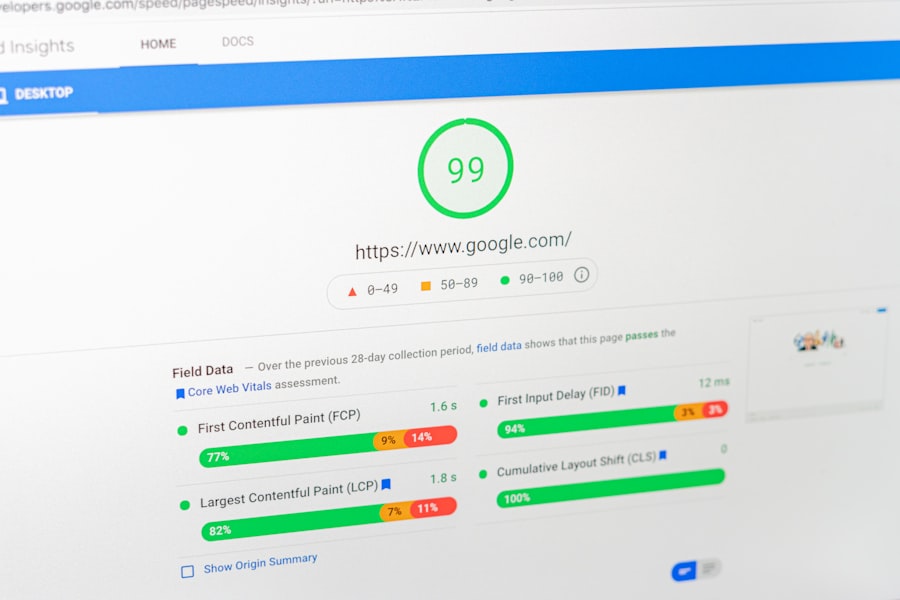
- Google PageSpeed Insights: This is an essential tool directly from Google. It analyzes your site and provides a score for both mobile and desktop, along with actionable recommendations for improvement based on Core Web Vitals.
- GTmetrix: GTmetrix provides a comprehensive breakdown of your page load speed, including Waterfall charts that show you the loading sequence of every element on your page, helping you pinpoint where delays occur.
- Pingdom Website Speed Test: Similar to GTmetrix, Pingdom offers detailed insights, including page size, load time, and the number of requests, along with a performance grade.
- WebPageTest: For more advanced users, WebPageTest allows you to test your site from various locations around the globe, using different browsers and connection speeds, providing a highly detailed analysis.
Interpreting Performance Metrics
Once you’ve run these tests, you’ll be faced with a wealth of data. It’s important to understand what the key metrics mean.
- Load Time (fully loaded time): This is the total time it takes for your page to completely render and all resources to be loaded. Aim for under 2-3 seconds, especially on mobile.
- Time to First Byte (TTFB): This measures how long it takes for your server to respond to a request. A high TTFB often indicates server-side issues.
- First Contentful Paint (FCP): The time it takes for the first piece of content (text, image, etc.) to appear on the screen. Users perceive sites with a faster FCP as more responsive.
- Largest Contentful Paint (LCP): This metric reports the render time of the largest image or text block visible within the viewport. A good LCP is crucial for perceived load speed.
- Cumulative Layout Shift (CLS): Measures the instability of your page’s layout. Unexpected shifting of content can lead to a terrible user experience, especially on mobile.
- Total Blocking Time (TBT): The total amount of time a page is blocked from responding to user input (like mouse clicks or keyboard presses).
- Speed Index: How quickly content is visually displayed during page load.
Pay close attention to the recommendations provided by these tools. They will often highlight specific issues like unoptimized images, render-blocking JavaScript, or inefficient CSS.
Optimizing Your Website’s Foundations (Server & Hosting)
The foundation of a fast website starts with your hosting and server configuration. Even with perfectly optimized content, a weak foundation will always hold you back.
Choosing the Right Hosting Provider
Your hosting provider is the core infrastructure of your website. Don’t skimp here; it’s an investment in your business’s online success.
- Shared Hosting (Often Insufficient): While cheap, shared hosting means your website shares server resources with hundreds or even thousands of other websites. If one site experiences a traffic surge, all sites on that server can slow down. It’s fine for absolute beginners but quickly becomes a bottleneck for growing small businesses.
- Managed WordPress Hosting (Recommended for WordPress Users): If you’re on WordPress, managed WordPress hosts like WP Engine, Kinsta, or SiteGround offer environments specifically optimized for WordPress. They handle updates, provide advanced caching, and often include CDN integration.
- Virtual Private Server (VPS) / Cloud Hosting: A VPS gives you dedicated resources within a shared physical server. Cloud hosting offers even more scalability and flexibility, allowing your resources to expand as your traffic grows. These are excellent options for growing businesses needing more power and control.
- Dedicated Server (For High-Traffic Sites): A dedicated server means your website has an entire server to itself. This offers maximum performance and control but comes with a higher price tag and requires more technical expertise.
Server-Side Optimizations
Beyond just the type of hosting, how your server is configured plays a massive role in performance.
- Server Location: Choose a data center geographically close to your primary audience. This reduces latency (the time it takes for data to travel) and speeds up content delivery.
- HTTP/2 (and HTTP/3): Ensure your server supports the latest HTTP protocols. HTTP/2 significantly improves how browsers request and receive multiple files from a server, making websites load faster. HTTP/3 takes this even further.
- PHP Version: If your site uses PHP (like WordPress), ensure your host is running the latest stable PHP version. Newer PHP versions offer substantial performance improvements over older ones.
- GZIP Compression: Enable Gzip compression on your server. This compresses your website’s files (HTML, CSS, JavaScript) before sending them to the browser, significantly reducing file sizes and load times. Most good hosts do this automatically, but confirm it’s active.
Streamlining Your Website’s Content

Once your foundation is solid, you need to turn your attention to the content itself. Unoptimized images, bulky code, and inefficient assets can easily negate all the server-side improvements.
Optimizing Images and Media
Images often account for the largest portion of a web page’s size. Proper image optimization can yield dramatic performance gains.
- Compress Images: Use image compression tools (like TinyPNG, ShortPixel, or Kraken.io) to reduce file sizes without noticeable loss in quality. Most website builders and CMS platforms have plugins or built-in features for this.
- Choose the Right Format:
- JPEG: Best for photographs and images with many colors.
- PNG: Ideal for images with transparency, logos, and graphics with sharp lines.
- WebP: A modern image format developed by Google that often provides superior compression compared to JPEG and PNG with similar quality. Implement WebP where possible.
- SVG: Perfect for scalable vector graphics like logos, icons, and illustrations. They are lightweight and scale without pixelation.
- Resize Images to Display Dimensions: Don’t upload a 4000px wide image if it’s only displayed at 800px on your website. Resize images to their actual display dimensions before uploading.
- Lazy Loading: Implement lazy loading for images and videos. This means these media elements only load when they enter the user’s viewport (i.e., when they scroll down and the content becomes visible). This significantly speeds up the initial page load.
- Specify Image Dimensions: Always include
widthandheightattributes for your images in your HTML. This prevents Cumulative Layout Shift (CLS) as the browser knows exactly how much space to reserve for the image before it loads.
Minifying CSS and JavaScript
CSS and JavaScript files contain the instructions for styling and interactivity on your website. These files can become quite large, especially with themes and plugins.
- Minification: This process removes unnecessary characters from code (like whitespace, comments, and line breaks) without changing its functionality. This reduces file size and speeds up parsing by the browser.
- Concatenation: Combine multiple CSS files into one and multiple JavaScript files into one. This reduces the number of HTTP requests the browser has to make, which can improve load times. (Note: With HTTP/2, concatenation is less critical, but minification remains important.)
- Defer Parsing of JavaScript: JavaScript can block the rendering of your page. “Deferring” scripts means they won’t execute until the HTML page has been fully parsed. This allows the content to display faster.
- Eliminate Render-Blocking Resources: PageSpeed Insights will often flag render-blocking CSS and JavaScript. Identify these files and either defer their loading, make them asynchronous, or inline critical CSS directly into the HTML for immediate rendering.
To enhance your understanding of website performance optimization for small businesses, you might find it beneficial to explore related topics such as the potential investment value of domain names. A recent article discusses the resale value of PK domains and offers insights into investment trends and predictions for 2025. You can read more about it in this informative piece, which highlights how choosing the right domain can impact your online presence and overall business success.
Leveraging Caching and Content Delivery Networks (CDNs)
| Metrics | Description |
|---|---|
| Page Load Time | The time it takes for a web page to load completely |
| Mobile Responsiveness | How well the website performs on mobile devices |
| Image Optimization | Reducing the file size of images to improve load times |
| Minimize HTTP Requests | Reducing the number of requests needed to load the page |
| Caching | Storing website data to reduce load times for returning visitors |
| Content Delivery Network (CDN) | Distributing website content across multiple servers to improve load times |
Caching and CDNs are powerful tools that reduce the workload on your server and bring content closer to your users, drastically improving performance.
Implementing Browser Caching
Browser caching stores copies of your website’s static files (images, CSS, JavaScript, fonts) on a visitor’s local computer after their first visit.
- How it Works: When that visitor returns to your site, or navigates to another page, their browser doesn’t need to re-download those cached files from your server. Instead, it retrieves them instantly from their local cache.
- Benefits: This dramatically speeds up subsequent page loads, reduces server load, and improves the perceived responsiveness of your site for repeat visitors.
- Implementation: You can control browser caching through HTTP headers in your server’s configuration (e.g., Apache’s
.htaccessfile or Nginx config) using directives likeExpiresorCache-Control. Many WordPress caching plugins handle this for you.
Utilizing Server-Side Caching
Beyond browser caching, your server itself can store cached versions of your dynamically generated pages.
- Page Caching: This stores a static HTML version of your dynamic pages (e.g., a blog post in WordPress). When a request comes in, the server can serve the pre-built HTML instead of processing PHP and database queries every time, significantly speeding up response times.
- Object Caching: For more complex applications, object caching stores database query results or other computed data in memory. This reduces the need to hit the database for frequently requested information.
- Database Caching: Similar to object caching, this specifically optimizes database interactions, which can be a bottleneck for dynamic sites.
Integrating a Content Delivery Network (CDN)
A CDN is a geographically distributed network of servers that caches your website’s static content and delivers it to users from the server closest to them.
- How it Works: When a user requests content from your site, the CDN routes the request to the nearest server point-of-presence (PoP). This PoP then delivers the cached content, reducing latency and speeding up delivery.
- Benefits:
- Faster Loading Times: Content is delivered from a server physically closer to the user.
- Reduced Server Load: The CDN offloads traffic from your origin server, especially during peak times.
- Improved Reliability and Uptime: If your origin server experiences an issue, the CDN can often still serve cached content, providing a layer of redundancy.
- Enhanced Security: Many CDNs offer built-in security features like DDoS protection and Web Application Firewalls (WAFs).
- Popular CDN Providers: Cloudflare (offers a free tier that’s excellent for small businesses), Sucuri, Amazon CloudFront, KeyCDN. Integrating a CDN is often straightforward, especially with WordPress plugins or direct settings within your hosting control panel.
Ongoing Maintenance and Monitoring
Website performance isn’t a “set it and forget it” task. To maintain optimal speed and efficiency, you need a routine of ongoing maintenance and monitoring.
Regular Website Audits
Periodically re-evaluate your website using the performance testing tools mentioned earlier.
- Scheduled Checks: Make it a habit to run PageSpeed Insights, GTmetrix, or Pingdom tests at least once a month, or after significant updates to your site (e.g., major plugin installations, theme changes, content overhauls).
- Identify New Bottlenecks: New content, themes, plugins, or even external scripts can introduce performance issues over time. Regular audits help you catch these before they significantly impact your users.
- Review Recommendations: The recommendations from these tools change as web standards evolve. Staying on top of them ensures your site remains current and optimized.
Keeping Software Updated
Outdated software is not only a security risk but can also lead to performance inefficiencies.
- CMS (e.g., WordPress): Always keep your Content Management System updated to the latest stable version. Updates often include performance enhancements, bug fixes, and security patches.
- Themes and Plugins: Similarly, ensure your themes and plugins are always updated. Developers frequently release updates to improve performance, fix compatibility issues, and patch vulnerabilities.
- PHP Version: As mentioned earlier, actively maintaining the latest PHP version on your server can provide significant speed boosts.
Database Optimization
For dynamic websites like those built with WordPress, the database can become bloated and slow over time.
- Clean Up Revisions: CMS platforms often store multiple revisions of posts and pages. While useful, these can accumulate and slow down your database. Regularly delete old post revisions (consider using a plugin for this on WordPress).
- Delete Unused Data: Remove unused themes, plugins, comments, spam, and transient options from your database.
- Optimize Database Tables: Your database software (e.g., MySQL) has tools to optimize tables, which can reclaim space and improve query performance. Many hosting providers and WordPress plugins offer one-click database optimization.
Monitoring for Uptime and Errors
A fast website is useless if it’s down or throwing errors.
- Uptime Monitoring: Use uptime monitoring services (like UptimeRobot, Freshping, or Pingdom) that notify you immediately if your website goes offline. This allows you to address issues promptly, minimizing downtime.
- Error Logs: Regularly check your server’s error logs and your website’s error logs (e.g., WordPress debug log). These logs can provide critical clues about performance issues, broken functionality, or security vulnerabilities that need attention.
- Google Search Console: Keep an eye on “Core Web Vitals” and “Crawl Stats” reports in Google Search Console. These provide direct feedback from Google about how your site is performing in the eyes of their crawlers and users.
By diligently following these steps, you’ll ensure your small business website is not just an online presence, but a high-performing asset that reliably attracts, engages, and converts your target audience, contributing directly to your bottom line and establishing a strong, trustworthy brand identity in the competitive digital marketplace.
FAQs
1. Why is website performance important for small businesses?
Website performance is important for small businesses because it directly impacts user experience, search engine rankings, and ultimately, the success of the business. A slow or poorly performing website can lead to higher bounce rates, lower conversion rates, and decreased visibility in search engine results.
2. What are some common factors that can affect website performance?
Common factors that can affect website performance include large image or video files, excessive use of plugins or scripts, inadequate hosting resources, and lack of browser caching. Additionally, poorly optimized code, outdated software, and excessive HTTP requests can also contribute to poor website performance.
3. How can small businesses optimize their website performance?
Small businesses can optimize their website performance by implementing strategies such as optimizing images and videos, minimizing the use of plugins and scripts, utilizing a content delivery network (CDN), enabling browser caching, and using a reliable and scalable hosting provider. Additionally, regularly updating software, minimizing HTTP requests, and implementing responsive web design can also improve website performance.
4. What are the benefits of optimizing website performance for small businesses?
Optimizing website performance for small businesses can lead to improved user experience, higher search engine rankings, increased website traffic, and ultimately, higher conversion rates and sales. Additionally, a well-performing website can enhance brand reputation and credibility, leading to long-term customer loyalty and trust.
5. How can small businesses measure and monitor their website performance?
Small businesses can measure and monitor their website performance using tools such as Google PageSpeed Insights, GTmetrix, Pingdom, and WebPageTest. These tools provide insights into various performance metrics such as page load times, file sizes, and server response times, allowing businesses to identify areas for improvement and track the impact of performance optimization efforts.









Add comment