
The Crucial Role of PHP Updates in Performance
You might be wondering why there’s so much talk about PHP version updates. After all, isn’t PHP just the server-side scripting language that powers a huge chunk of the internet? Yes, it is. But like any other sophisticated software, PHP is under constant development, with new versions being released regularly. These aren’t just minor tweaks; often, they represent significant leaps forward in terms of performance, security, and developer features. Ignoring these updates is akin to driving an old car that’s less fuel-efficient, lacks modern safety features, and is prone to breakdowns, all while newer, better models are available.
The impact of an outdated PHP version on your website can be profound and detrimental. You’ll experience slower page loading times, which directly affects user experience and your search engine rankings. Google and other search engines prioritize fast-loading websites, and if yours is sluggish, you’re at a disadvantage. Beyond speed, an older PHP version leaves your website vulnerable to a growing number of security threats. As hackers discover new exploits, PHP developers release patches and fixes in newer versions. Staying on an older version means you’re operating with known security holes that malicious actors can easily exploit. This article will delve into the critical benefits of keeping your PHP version current, exploring how these updates translate into tangible improvements for your website’s speed, security, and overall health. You’ll gain a clear understanding of why this seemingly technical task is, in fact, a cornerstone of successful online presence.
The Evolution of PHP and Performance Gains
PHP has undergone a remarkable transformation over the years. Early versions, while revolutionary for their time, were not known for their blistering speed. However, with each major release, particularly since PHP 7.0, the focus on performance has been paramount. The developers have invested heavily in optimizing the underlying engine, leading to substantial improvements in how quickly PHP code is executed. This isn’t just a marginal gain; we’re talking about often doubling or even tripling the request handling capacity compared to much older versions.
When your website receives a request, the PHP interpreter processes the code, queries databases, and generates the HTML that is then sent to the user’s browser. A faster PHP interpreter means this entire process happens more quickly. This translates directly to a snappier user experience. Imagine a user clicking a link on your website. With an older PHP version, they might wait a noticeable fraction of a second, or even a full second, for the page to load. With a newer version, that same page could load almost instantaneously. These small differences accumulate, especially on websites with many dynamic elements or high traffic, ultimately shaping how users perceive your brand and interact with your content.
Understanding JIT Compilation and Opcode Caching
Two key advancements that significantly contribute to PHP’s performance boost are Just-In-Time (JIT) compilation and opcode caching. You might be familiar with the concept of compilation from other programming languages. Traditionally, PHP has been an interpreted language. This means that every time a script runs, the PHP engine has to parse and interpret the code line by line.
Opcode caching, implemented by tools like OPcache, addresses part of this inefficiency. When a PHP script is executed for the first time, the PHP engine converts the human-readable code into intermediate bytecode, known as opcodes. Instead of re-parsing and re-generating these opcodes for every subsequent request, opcode caches store them in memory. This means that on subsequent requests, the PHP engine can directly execute the pre-compiled opcodes, saving a significant amount of processing time. It’s like having a compiled version of your code ready to go, rather than needing to translate it from scratch every time. This alone provides a substantial performance improvement, especially for frequently accessed scripts.
JIT compilation, introduced with PHP 8, takes performance a step further. While opcode caching helps avoid parsing and compiling on every request, the opcodes themselves are still interpreted. JIT compilers, on the other hand, identify frequently executed parts of the opcode and compile them into native machine code during runtime. This machine code can then be executed directly by the CPU, bypassing the interpreter entirely. The result is a dramatic reduction in execution time for computationally intensive tasks, making PHP even faster for complex applications. Think of it as taking the most common instructions and translating them into the CPU’s native language just in time for execution, rather than having an interpreter translate them every single time. This is particularly beneficial for applications with heavy processing, such as e-commerce platforms, content management systems, and APIs that perform extensive data manipulation.
In addition to understanding how PHP version updates can enhance website speed and security, it’s also beneficial to explore the broader implications of hosting choices on overall website performance. For instance, the article on shared hosting, titled “What is Shared Hosting: Is It Good for You?” provides valuable insights into how different hosting environments can affect your site’s efficiency and reliability. You can read more about it here: What is Shared Hosting: Is It Good for You?.
Fortifying Your Website with Enhanced Security
Beyond speed, security is arguably the most compelling reason to keep your PHP version up to date. You understand the importance of protecting your website from malicious attacks, data breaches, and unauthorized access. An outdated PHP version is a gaping security hole, a welcome mat for cybercriminals. As new vulnerabilities are discovered in older PHP versions, developers release security patches and fixes in newer versions. If you’re not updating, you’re effectively operating with known weaknesses that hackers are actively exploiting.
Staying on an old PHP version is like leaving your front door unlocked with a sign that says, “Please enter.” Security researchers and malicious actors are constantly probing for weaknesses in widely used software. When a vulnerability is found in an older PHP version, it quickly becomes public knowledge. Attackers then create automated tools and scripts to scan the internet for websites running those vulnerable versions. Once identified, they can exploit these weaknesses to inject malicious code, steal sensitive data, deface your website, or even take complete control of your server. The consequences can be catastrophic, leading to reputational damage, financial losses, and legal liabilities, especially if customer data is compromised.
Patching Known Vulnerabilities and Exploits
The most direct security benefit of PHP updates is the patching of known vulnerabilities and exploits. Every new PHP version, and often minor releases within a major version, includes fixes for security flaws discovered since the previous release. These flaws can range from buffer overflows and denial-of-service vulnerabilities to cross-site scripting (XSS) and SQL injection vectors. When a vulnerability is found, the PHP development team works diligently to create a patch. This patch is then included in the next official release.
If you continue to use an older, unpatched PHP version, your website remains exposed to these known attacks. Imagine a scenario where a critical vulnerability is discovered in PHP 7.4. The PHP team releases PHP 8.0, which includes a fix for this vulnerability. If your website is still running PHP 7.4, it is immediately susceptible to any attacker who knows about that flaw. They can then craft an attack that specifically targets that weakness. This is not a hypothetical threat; it’s a constant reality in the world of web security. Staying updated means you’re proactively closing these doors before attackers can walk through them.
Stronger Cryptography and Security Features
New PHP versions also frequently introduce stronger cryptographic functions and enhanced security features. Cryptography is fundamental to securing sensitive data, such as user passwords, payment information, and confidential communications. As computing power increases, older cryptographic algorithms can become less secure and more susceptible to brute-force attacks. Newer PHP versions often deprecate weaker algorithms and integrate support for more robust and modern cryptographic standards. This means your website’s data, particularly data in transit and at rest, is better protected against interception and tampering.
Furthermore, PHP updates often bring in new security-focused functions and features that developers can leverage to build more secure applications. This could include improved hashing algorithms for password storage, better input filtering mechanisms, enhanced session management tools, and more secure ways to handle file uploads. For example, features like stricter type declarations and null coalescing operators, while primarily developer-centric, can indirectly contribute to security by making code less prone to common programming errors that could lead to vulnerabilities. By providing developers with a more secure toolkit, newer PHP versions make it easier to write robust and resilient code, thereby reducing the overall attack surface of your website. These ongoing improvements are a testament to the PHP team’s commitment to security as a core tenet of the language’s development.
The Impact on Search Engine Optimization (SEO)
You might not immediately connect PHP version updates with your website’s search engine optimization, but the two are inextricably linked. Search engines, particularly Google, prioritize user experience above all else. A slow, insecure website provides a poor user experience, and Google will penalize it in its search rankings. Conversely, a fast, secure, and reliable website is rewarded with better visibility. Therefore, keeping your PHP version current is an indirect, yet powerful, strategy for improving your SEO.
Think about it from Google’s perspective. Their goal is to deliver the most relevant and highest-quality results to their users. If your website is slow to load, users are more likely to bounce back to the search results page and try another link. If your website is deemed insecure, users could be exposed to malware or data breaches, which is a major red flag for Google. By addressing these core performance and security issues through PHP updates, you’re essentially telling Google that your website is a high-quality resource that deserves to be seen by more people. This positive signal contributes significantly to your overall SEO health.
Page Speed as a Ranking Factor
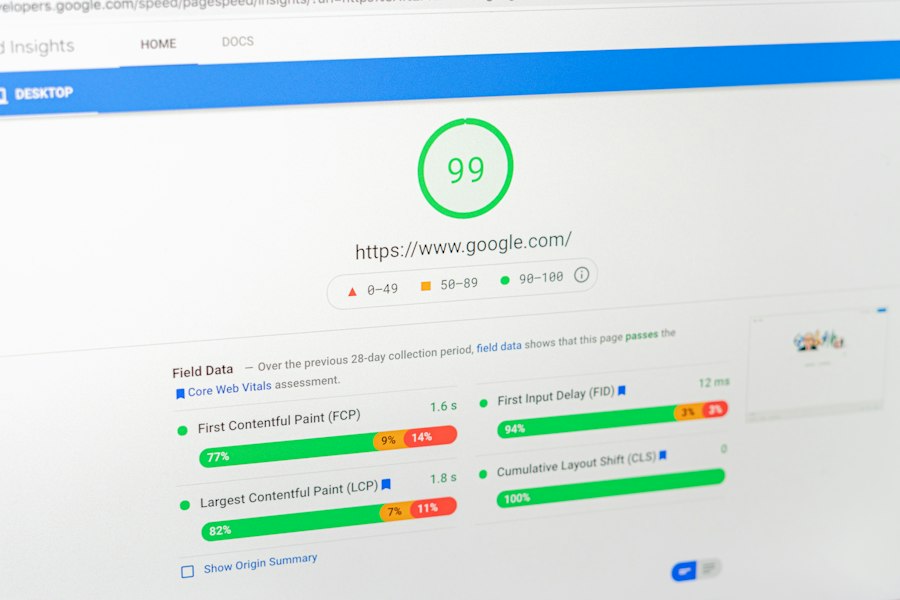
Page speed has been a confirmed ranking factor for Google for many years. In 2021, Google rolled out the “Core Web Vitals” initiative, further emphasizing the importance of user experience metrics like Largest Contentful Paint (LCP), First Input Delay (FID), and Cumulative Layout Shift (CLS). While LCP and FID are directly influenced by how quickly your server responds and renders content, CLS is also indirectly affected by server response times influencing client-side rendering. A faster PHP version directly contributes to a better LCP score because the server can generate the initial HTML and send it to the browser more quickly. This reduces the time it takes for the largest content element on your page to become visible.
Furthermore, improved page speed reduces bounce rates. When users don’t have to wait long for a page to load, they are more likely to stay on your site, explore more content, and engage with your offerings. This increased engagement sends positive signals to search engines, indicating that your content is valuable and relevant. Conversely, a slow website leads to higher bounce rates, which signals to search engines that users are not finding what they need or are frustrated by the slow experience, ultimately harming your rankings. By updating PHP, you are directly optimizing a critical technical aspect that influences page speed, which in turn boosts your SEO.
User Experience and Engagement
Beyond direct ranking factors, PHP updates profoundly impact overall user experience and engagement, which indirectly but powerfully affects SEO. A fast and secure website provides a seamless and enjoyable experience for your visitors. Imagine a user trying to make a purchase on your e-commerce site. If pages load quickly, product images appear instantly, and the checkout process is smooth, they are more likely to complete their transaction. If, however, they encounter delays at every click, wait for images to load, and feel a general sluggishness, they are likely to abandon their cart and go to a competitor’s site.
Higher engagement translates into longer session durations, more pages per session, and lower bounce rates – all positive signals for search engines. Google’s algorithms are sophisticated enough to understand user behavior patterns. If users are spending more time on your site, interacting with your content, and returning frequently, it suggests that your website provides value. These behavioral metrics are a strong indicator of quality and can contribute to improved search rankings. Conversely, a site that is slow, buggy due to compatibility issues with an old PHP version, or perceived as insecure, will drive users away, leading to poor engagement metrics and a corresponding dip in SEO performance. Therefore, investing in PHP updates is an investment in your user’s satisfaction, which ultimately pays dividends in your search visibility.
Long-Term Benefits and Future-Proofing
You’re likely looking for strategies that not only address immediate concerns but also provide long-term stability and growth for your website. PHP version updates are precisely that. They aren’t just about fixing current problems; they’re about future-proofing your online presence. By staying current, you’re ensuring your website remains compatible with the latest web technologies, is easier to maintain, and is ready to adapt to future changes in the digital landscape. This forward-thinking approach is crucial for any successful long-term online strategy.
Consider the rapidly evolving nature of the internet. New browsers are released, web standards are updated, and user expectations continuously rise. Websites built on outdated foundations struggle to keep up. They become difficult to integrate with new services, challenging to develop new features for, and eventually, expensive to maintain. Adopting a proactive approach to PHP updates minimizes these future headaches and positions your website for continued relevance and growth. It’s an investment that pays off over many years, preventing a gradual decay into technical debt and obsolescence.
Maintaining Compatibility with Modern Technologies
One of the most significant long-term benefits of regular PHP updates is maintaining compatibility with modern web technologies and software. Your website rarely exists in a vacuum. It likely relies on a content management system (CMS) like WordPress, Joomla, or Drupal, along with numerous plugins, themes, and third-party integrations (e.g., payment gateways, CRM systems, analytics tools). All of these components are also under continuous development and are designed to work optimally with modern PHP versions.
As these systems evolve, they often drop support for older, deprecated PHP versions. If your website is running an outdated PHP version, you’ll eventually encounter compatibility issues. You might find that you can’t update your CMS to the latest version because it requires a newer PHP version. This, in turn, prevents you from applying security patches to your CMS, gaining access to new features, or using the latest, most secure plugins and themes. You’ll be stuck on an island, unable to leverage the advancements in the ecosystem. This creates a cascade of problems: security vulnerabilities accumulate, new features cannot be implemented, and your development team faces increasing challenges and costs trying to work around these limitations. By staying updated, you ensure your entire software stack remains harmonized and functional.
Access to New Language Features and Developer Tools
For developers, new PHP versions offer a treasure trove of new language features, syntax improvements, and developer tools that can significantly enhance productivity and code quality. These aren’t just cosmetic changes; they often represent powerful new ways to write more efficient, readable, and maintainable code. For example, PHP 8 introduced features like named arguments, union types, and attributes, which streamline development and reduce the likelihood of errors.
Access to these new features means your development team can write cleaner code, implement complex functionalities more easily, and leverage modern programming paradigms. This translates into faster development cycles, fewer bugs, and ultimately, a more robust and feature-rich website. Furthermore, new PHP versions often come with improved error handling, debugging tools, and performance profiling capabilities, making it easier for developers to identify and resolve issues. If your developers are forced to work with an ancient PHP version, they are essentially coding with one hand tied behind their back, using outdated methodologies and tools. This not only frustrates developers but also slows down progress and increases development costs. By providing them with the latest PHP, you empower them to build better, more efficient applications for your business.
In addition to understanding how PHP version updates enhance website speed and security, it’s also beneficial to explore broader strategies for online presence. For instance, a recent article discusses the importance of domain strategy for businesses in Pakistan, highlighting how choosing the right domain can significantly impact visibility and credibility. You can read more about this in the article on domain strategy for Pakistani businesses. This knowledge can complement your efforts in optimizing your website’s performance and security through regular PHP updates.
Strategies for Successful PHP Upgrades
| PHP Version | Performance Improvement | Security Enhancements | Notable Features Impacting Speed | End of Support Date |
|---|---|---|---|---|
| PHP 7.0 | Up to 2x faster than PHP 5.6 | Improved error handling and security fixes | Introduction of the new Zend Engine 3.0 | December 3, 2018 |
| PHP 7.1 | 5-10% performance boost over 7.0 | Added nullable types and better cryptography support | Asynchronous signal handling | December 1, 2019 |
| PHP 7.2 | Minor speed improvements | Argon2 password hashing support, improved TLS security | Improved object type hinting | November 30, 2020 |
| PHP 7.3 | Up to 5% faster than 7.2 | Enhanced security for cryptographic functions | Flexible Heredoc and Nowdoc syntax | December 6, 2021 |
| PHP 7.4 | Up to 10% faster than 7.3 | Typed properties, improved type variance for better code safety | Preloading for faster script execution | November 28, 2022 |
| PHP 8.0 | Up to 20% faster than 7.4 | JIT compiler, union types, and improved error handling | Just-In-Time (JIT) compilation | November 26, 2023 |
| PHP 8.1 | 5-10% faster than 8.0 | Readonly properties, enums, and improved Fibers for async | Fibers for asynchronous programming | November 25, 2024 |
You understand the importance of updating your PHP version, but the prospect of a major upgrade can seem daunting. It’s a critical process that requires careful planning and execution to avoid disrupting your website. Rushing into an update without proper preparation can lead to unexpected errors, website downtime, and a frustrating experience. However, with a structured approach, you can successfully navigate the upgrade process and reap all the benefits discussed.
The key is to treat a PHP upgrade as a mini-project. It involves assessment, planning, testing, and a controlled rollout. Don’t assume that because your current setup is stable, the upgrade will be seamless. PHP versions can introduce breaking changes, deprecate functions, or alter behaviors that your existing code relies on. Being prepared for these potential issues is crucial. By following best practices, you can minimize risks and ensure a smooth transition to a faster, more secure, and more future-proof website.
Pre-Upgrade Assessment and Planning
Before you even think about touching your live server, a thorough pre-upgrade assessment and planning phase is essential. This is where you identify potential issues and strategize how to mitigate them.
Auditing Your Current Environment
Start by gaining a comprehensive understanding of your current website’s environment. Document your existing PHP version, web server (Apache, Nginx), operating system, database (MySQL, PostgreSQL), and any other critical server software. List all installed CMS (WordPress, Joomla, etc.) versions, themes, plugins, and custom code. The more detailed your inventory, the better. You’ll want to check the compatibility requirements for the target PHP version against all these components. Many CMS providers, plugin developers, and theme creators will specify which PHP versions they officially support. Look for this information in their documentation.
Use tools that can scan your code for deprecations and incompatibilities with newer PHP versions. Tools like PHPStan, Psalm, or even simple regex searches can help identify functions that have been removed, changed, or marked as deprecated. This gives you a head start on what code might need modification. You should also review your server logs for any existing PHP errors or warnings, as these might indicate underlying issues that could be exacerbated by an upgrade.
Setting Up a Staging Environment
Never, under any circumstances, attempt a PHP upgrade directly on your live production website. The golden rule is to always set up a dedicated staging environment that is an exact replica of your production site. This staging environment should mirror your production server’s hardware, software, and data as closely as possible. Many hosting providers offer easy ways to create staging sites, or you can set one up manually.
The staging environment provides a safe sandbox where you can test the upgrade process without impacting your live users. You can experiment with different PHP versions, identify issues, fix errors, and ensure everything functions correctly before deploying to production. This significantly reduces the risk of downtime and provides peace of mind. Without a staging environment, you’re effectively gambling with your website’s availability and your business’s reputation.
The Upgrade Process and Post-Upgrade Testing
Once your planning is complete and your staging environment is ready, you can proceed with the actual upgrade. Remember, this process will first happen on your staging site.
Performing the Upgrade on Staging
With a full backup of your staging environment in hand (just in case!), begin the PHP upgrade. This usually involves changing the PHP version setting within your hosting control panel (cPanel, Plesk, etc.) or by manually updating PHP on your server if you have root access. Once the PHP version is updated on staging, immediately begin your testing.
Thoroughly test every critical functionality of your website. This includes:
- Navigation: Click through all menus, links, and internal pages.
- Forms: Submit all contact forms, registration forms, and comment forms.
- E-commerce: If applicable, perform a complete purchase cycle, from adding items to the cart, to checkout, and order confirmation.
- User Accounts: Log in and out with different user roles (admin, editor, subscriber, customer).
- Dynamic Content: Check any search functions, filters, and interactive elements.
- Third-Party Integrations: Verify that payment gateways, social media feeds, and external APIs are still functioning correctly.
- Admin Panel: Ensure you can access and manage your CMS backend without issues.
During testing, pay close attention to any error messages displayed on the front-end or in your PHP error logs. These will be crucial for identifying and debugging any compatibility issues. Use the insights from your pre-upgrade audit to guide your testing, focusing on areas you identified as potentially problematic.
Addressing Issues and Deploying to Production
It’s highly probable that you’ll encounter some issues during testing, especially if you’re upgrading from a very old PHP version. This is precisely why you use a staging environment. Document every error, warning, and unexpected behavior. Work through these issues systematically. This might involve:
- Updating Plugins/Themes: Many issues can be resolved by simply updating your CMS, themes, or plugins to their latest versions, as developers often release updates to maintain compatibility with newer PHP versions.
- Modifying Custom Code: For custom code or older, unmaintained plugins, you might need to adjust the code to comply with the new PHP version’s syntax or API changes. This could involve replacing deprecated functions, adjusting type hints, or rewriting problematic sections.
- Configuration Changes: Sometimes, PHP extensions or server configurations might need to be tweaked to optimize performance or resolve specific errors with the new PHP version.
Once all issues are resolved on the staging environment, and you are confident that your website is functioning perfectly, perform one final comprehensive backup of your live production website. Then, and only then, apply the PHP version update to your production server. After the production upgrade, conduct a quick smoke test of critical functionalities to ensure everything is running as expected. Monitor your website closely for the next few hours or days, checking server logs and website performance metrics to catch any subtle issues that might have been missed. By following these structured steps, you significantly reduce the risk and ensure a successful PHP version upgrade, unlocking all the speed and security benefits for your website.
FAQs
What are the main benefits of updating to the latest PHP version?
Updating to the latest PHP version provides numerous benefits, including improved performance, enhanced security features, and access to new functionalities. Each version typically includes optimizations that can significantly speed up the execution of scripts, reduce memory usage, and improve overall website responsiveness.
How does PHP version updates enhance website security?
PHP version updates often include patches for known vulnerabilities and security flaws. By using the latest version, developers can protect their websites from potential attacks and exploits that target outdated versions. Regular updates ensure that security measures are up-to-date, reducing the risk of data breaches and unauthorized access.
Can updating PHP affect website compatibility?
Yes, updating PHP can affect website compatibility, especially if the codebase relies on deprecated functions or features that have been removed in newer versions. It is essential to test the website thoroughly after an update to ensure that all functionalities work as intended and to make necessary adjustments to the code.
How often should PHP be updated for optimal performance?
It is recommended to update PHP at least once a year or as soon as a new stable version is released. Keeping PHP updated ensures that websites benefit from the latest performance enhancements, security fixes, and new features. Regular updates help maintain optimal performance and security standards.
What steps should be taken before updating PHP?
Before updating PHP, it is crucial to back up the website and database to prevent data loss. Additionally, developers should review the release notes for the new version to understand changes and deprecated features. Testing the website in a staging environment before deploying the update to production is also advisable to identify and resolve any compatibility issues.








Add comment