

As your website gains traction, the excitement of increased visitors can quickly turn into a logistical challenge. It’s a good problem to have, but a problem nonetheless. Effectively managing a growing influx of traffic isn’t just about keeping your site online; it’s about optimizing user experience, maintaining performance, and ultimately, leveraging that growth for sustained success. You’ve worked hard to attract those eyes, now you need to ensure they have the best possible experience and become returning customers or loyal followers.
Before you can effectively manage growth, you need to understand where you currently stand. Guessing your way through traffic spikes is a recipe for disaster. You need data, and you need to know how to interpret it.
Your Analytical Toolkit
You should be intimately familiar with your website analytics platform. Whether you use Google Analytics, Adobe Analytics, or another solution, this is your mission control. You’re looking for patterns, anomalies, and key performance indicators (KPIs).
- Page Views and Sessions: These are your most basic metrics, showing you the volume of traffic. Are they steadily increasing? Are there sudden spikes?
- Unique Visitors: This tells you how many individual people are coming to your site, differentiating them from repeat visits.
- Traffic Sources: Where are your visitors coming from? Organic search, social media, direct, referral? Understanding this helps you predict future growth and focus your marketing efforts.
- Geographic Distribution: Knowing where your visitors are located can inform your server infrastructure decisions and content localization strategy.
- Device Usage: Are most of your visitors on desktop, mobile, or tablet? This impacts your site’s responsiveness and overall design.
- Bounce Rate: A high bounce rate, especially during a traffic spike, can indicate performance issues or content that isn’t meeting user expectations.
- Conversion Rate: If your site has a specific goal (purchase, sign-up, download), track how traffic growth impacts this. More traffic should ideally lead to more conversions, not just more eyeballs.
Identifying Growth Triggers
What’s causing your traffic to grow? Is it a successful marketing campaign, a viral social media post, a news mention, or consistent SEO efforts? Understanding these triggers allows you to anticipate future growth and prepare accordingly.
- Marketing Campaigns: If you’re running ads or email campaigns, track their impact on traffic in real-time.
- Content Virality: A piece of content might unexpectedly take off. Monitor social shares and external links.
- Seasonal Trends: Is your business subject to seasonal peaks? Prepare in advance for these predictable increases.
- External Mentions: A feature on a popular blog or news site can send a flood of new visitors your way. Set up alerts for brand mentions.
Managing website traffic growth efficiently is crucial for maintaining a seamless user experience, and one important aspect of this is ensuring that your site is free of broken links. A related article that delves into this topic is “A Guide on How to Find and Fix 404 Pages,” which provides valuable insights on identifying and resolving errors that can arise as your traffic increases. You can read it here: A Guide on How to Find and Fix 404 Pages.
Optimizing Your Website’s Performance
Even with low traffic, a slow website is a poor experience. With increased traffic, performance issues become amplified, leading to frustration, lost conversions, and a higher bounce rate. You must ensure your site can handle the load gracefully.
Server and Hosting Infrastructure
This is the backbone of your website. As traffic grows, your current hosting solution might become insufficient. Don’s wait for your site to crash before considering an upgrade.
- Scalable Hosting Solutions: Look for hosting providers that offer elastic scaling, allowing you to automatically or manually increase resources (CPU, RAM, bandwidth) as needed. Options include Virtual Private Servers (VPS), dedicated servers, or cloud hosting (AWS, Google Cloud, Azure).
- Load Balancing: Distribute incoming network traffic across multiple servers to ensure no single server becomes a bottleneck. This is crucial for high-traffic sites.
- Content Delivery Networks (CDNs): CDNs cache your website’s static content (images, CSS, JavaScript) on servers geographically closer to your users. This dramatically speeds up content delivery, reduces the load on your origin server, and provides global reach.
- Database Optimization: Your database can be a significant bottleneck. Optimize queries, index tables appropriately, and consider caching frequently accessed data.
- Regular Backups: While not directly performance-related, robust backup strategies are critical for disaster recovery. If something goes wrong during a traffic surge, you need to be able to restore quickly.
Frontend and Backend Optimization
Performance isn’t just about your server. How your website’s code and assets are structured plays a huge role.
- Image Optimization: Compress images without sacrificing quality. Use modern formats like WebP. Lazy load images so they only load when they are visible in the user’s viewport.
- Minify CSS, JavaScript, and HTML: Remove unnecessary characters, whitespace, and comments from your code to reduce file sizes.
- Browser Caching: Configure your server to tell browsers to store certain files (like CSS and JavaScript) locally so they don’t have to download them every time a user visits your site.
- Asynchronous Loading: Load non-essential scripts asynchronously (in the background) so they don’t block the rendering of critical content.
- Reduce HTTP Requests: Combine CSS and JavaScript files where possible to reduce the number of requests the browser has to make.
- Code Efficiency: Review your backend code (e.g., PHP, Python, Node.js) for inefficiencies. Optimize algorithms, reduce redundant operations, and use efficient data structures.
Enhancing User Experience (UX) During Growth

Traffic growth is meaningless if users aren’t having a good experience. A positive UX encourages longer visits, repeat customers, and word-of-mouth referrals.
Responsive Design Across Devices
With a significant portion of traffic coming from mobile devices, your site must look and function flawlessly on all screen sizes.
- Mobile-First Approach: Design your website with mobile users in mind first, then scale up for larger screens. This ensures a streamlined experience for the majority. Your site should adapt fluidly to different viewports and input methods.
- Fast Loading on Mobile: Mobile networks can be slower. Prioritize mobile performance by minimizing asset sizes and optimizing for quick initial page loads.
- Touch-Friendly Navigation: Ensure buttons and links are large enough to be easily tapped on touchscreens.
Intuitive Navigation and Clear Calls to Action
More traffic means more diverse users. Make it easy for everyone to find what they’re looking for.
- Simplified Menus: Avoid overly complex navigation structures. Use clear, descriptive labels.
- Prominent Search Functionality: For content-heavy sites, a working search bar is essential.
- Clear CTAs: Guide users towards your desired actions (e.g., “Buy Now,” “Sign Up,” “Read More”) with prominent and well-written calls to action.
- Internal Linking Strategy: Help users discover more of your content and improve SEO by strategically linking relevant pages within your site.
Content Quality and Relevance
Your content is why people are visiting. It needs to continue to be excellent.
- Up-to-Date Information: Especially for evergreen content, ensure all information is current and accurate.
- Engaging Formatting: Use headings, subheadings, bullet points, and short paragraphs to make content scannable and easy to read.
- Visual Appeal: Incorporate high-quality images, videos, and infographics to break up text and enhance engagement.
- Personalization (Where Applicable): As traffic grows, if you have the data, consider personalizing content recommendations or offers to individual users.
Monitoring, Testing, and Iteration
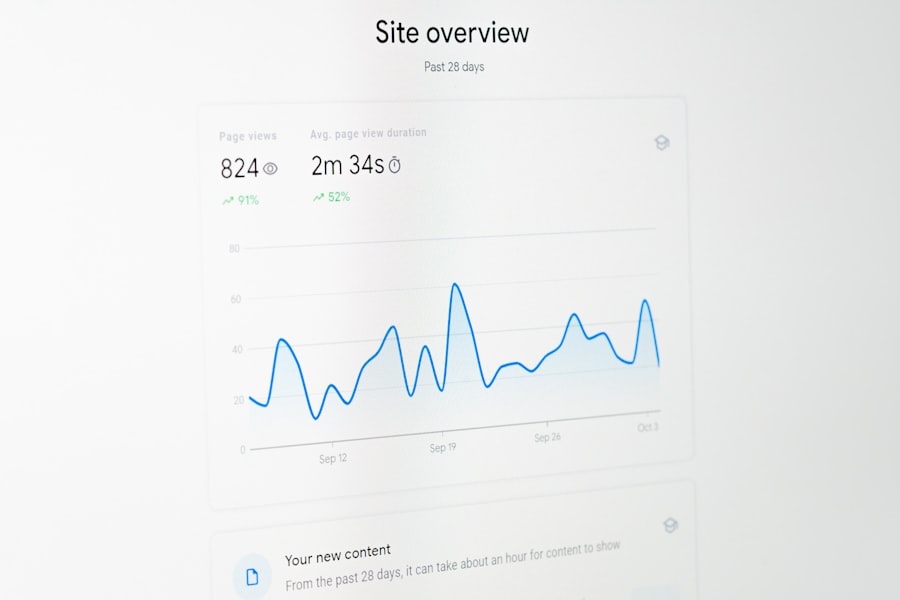
Managing traffic growth is an ongoing process, not a one-time fix. You need to constantly monitor, test, and adapt.
Real-time Performance Monitoring
Don’t wait for users to report issues. Proactive monitoring is key.
- Uptime Monitoring: Use tools that continuously check if your website is online and alert you immediately if it goes down.
- Performance Metrics Tracking: Monitor server load, response times, database queries, and bandwidth usage in real-time. Tools like New Relic, Datadog, or even your hosting provider’s dashboard can assist.
- Error Logging: Track server errors (5xx status codes) and client-side errors (JavaScript errors) to identify and fix issues quickly.
- Google Search Console: This tool provides insights into your site’s performance in Google Search results, including crawl errors and Core Web Vitals.
Stress Testing Your Infrastructure
Before a predictable traffic spike, or if you anticipate significant growth, stress test your website.
- Simulate Load: Use tools like Apache JMeter, LoadRunner, or cloud-based solutions to simulate thousands of concurrent users interacting with your site.
- Identify Bottlenecks: Observe how your servers, database, and application perform under stress. This helps you identify weak points before they cause real-world problems.
- Adjust and Retest: Based on the results, make necessary adjustments to your infrastructure or code, and then retest.
A/B Testing for Continuous Improvement
As your audience grows, you have more data to make informed decisions about design and content changes.
- Test Design Elements: Experiment with different layouts, button colors, images, and fonts to see what resonates best with your audience.
- Optimize CTAs: Test different wording, placement, and styling of calls to action to improve conversion rates.
- Content Variations: For key pages, test different headlines, intros, or even entire sections of content to see what engages users more.
- Landing Page Optimization: If you’re driving traffic to specific landing pages, constantly A/B test their elements to maximize conversions.
Managing a surge in website traffic can be challenging, but understanding the foundational aspects of your hosting options can significantly ease the process. For those looking to optimize their website’s performance during periods of increased visitors, exploring the benefits of business hosting is essential. You can learn more about this in the article on business hosting, which provides a comprehensive guide for beginners. By choosing the right hosting plan, you can ensure your site remains responsive and efficient, even under heavy traffic.
Capitalizing on Your Increased Traffic
| Metrics | Strategies |
|---|---|
| Website Traffic | Optimize website speed and performance, use content delivery network (CDN), and implement caching |
| Server Capacity | Upgrade hosting plan, use scalable cloud hosting, and optimize server configurations |
| Website Security | Implement security measures such as SSL certificate, firewall, and regular security audits |
| Content Management | Use efficient content management system (CMS), optimize images and videos, and leverage browser caching |
| Monitoring and Analysis | Utilize website analytics tools, set up alerts for traffic spikes, and regularly monitor website performance |
Growth isn’t just about survival; it’s about leveraging that momentum to achieve your business goals.
Cultivating Your Audience
Don’t let new visitors come and go without forming a connection.
- Email List Growth: Offer compelling incentives (e-books, exclusive content, discounts) to encourage visitors to sign up for your email list. This is one of the most effective ways to build a loyal audience.
- Social Media Engagement: Make it easy for visitors to follow you on social media platforms. Engage with comments and messages.
- Community Building: If appropriate for your niche, consider creating forums or community groups where users can interact with each other and with you.
- Retargeting Campaigns: Use pixel data to retarget visitors who haven’t converted, reminding them of your offerings and encouraging them to return.
Monetization and Conversion Optimization
More traffic presents more opportunities for revenue or achieving your primary goals.
- Conversion Rate Optimization (CRO): Continuously analyze your conversion funnels and identify drop-off points. Even small improvements in conversion rates can have a significant impact with higher traffic.
- Product/Service Optimization: Pay attention to which products or services are most popular during traffic spikes. Can you promote them further or offer related items?
- Upselling and Cross-selling: Once a user converts, consider opportunities to upsell them to higher-value offerings or cross-sell related products.
- Ad Revenue (if applicable): If you rely on advertising, higher traffic will naturally increase your ad impressions and potential earnings. Ensure ad placement is optimized without being intrusive.
Scaling Your Business Operations
Increased website traffic often correlates with increased demand for your product or service. Your backend operations must keep pace.
- Customer Support: Prepare for an increase in inquiries. Train more staff, implement chatbots, or create comprehensive FAQ sections.
- Inventory Management: For e-commerce businesses, ensure you have sufficient stock to meet demand without overselling.
- Fulfillment and Logistics: Streamline your shipping and delivery processes to handle larger volumes efficiently.
- Team Expansion: If your business is service-oriented, you might need to hire more staff or expand your team to maintain service quality.
In conclusion, successfully managing website traffic growth is a multifaceted challenge that requires a proactive, data-driven, and iterative approach. By understanding your traffic, optimizing your website’s performance, prioritizing user experience, constantly monitoring and testing, and strategically capitalizing on your growth, you can transform what could be a headache into a powerful engine for sustained success. You’re not just reacting to traffic; you’re orchestrating its flow to achieve your ultimate objectives.
FAQs
What are some common challenges associated with website traffic growth?
Some common challenges associated with website traffic growth include server overload, slow website loading times, increased demand for customer support, and potential security vulnerabilities.
What are some strategies for handling website traffic growth efficiently?
Some strategies for handling website traffic growth efficiently include optimizing website performance, scaling server resources, implementing content delivery networks (CDNs), utilizing caching techniques, and automating processes where possible.
How can website performance be optimized to handle increased traffic?
Website performance can be optimized to handle increased traffic by minimizing HTTP requests, reducing server response time, optimizing images and other media, leveraging browser caching, and using a content delivery network (CDN) to distribute content geographically.
What are some ways to scale server resources to accommodate increased traffic?
Some ways to scale server resources to accommodate increased traffic include upgrading hardware, utilizing cloud hosting services, implementing load balancing, and optimizing database performance.
What are the potential risks of not efficiently handling website traffic growth?
The potential risks of not efficiently handling website traffic growth include poor user experience, decreased search engine rankings, loss of potential customers, increased security vulnerabilities, and potential damage to the brand’s reputation.









Add comment