

You’ve got a fantastic small business, a brilliant idea, and a burning desire to succeed. Now, it’s time to take that passion online and reach a wider audience. But building a website isn’t just about picking a template and slapping some words on it. It’s a strategic endeavor that requires careful planning, foresight, and a deep understanding of your business goals. This comprehensive guide will walk you through the essential steps of website planning, ensuring your online presence is a powerful asset, not an afterthought.
Before you even think about colors or fonts, you need to understand why you’re building this website. What do you want it to achieve for your small business? This foundational step will dictate every decision you make going forward.
Identifying Your Core Objectives
Are you aiming to generate leads, sell products directly, provide information, build a community, or a combination of these? Be specific.
- Lead Generation: If your business relies on attracting new clients for services (e.g., consulting, plumbing, legal advice), your website should be optimized to capture contact information, encourage inquiries, and showcase your expertise. You’ll need clear calls to action (CTAs), contact forms, and compelling service descriptions.
- E-commerce Sales: If you’re selling physical or digital products, your website’s primary goal is conversion. This means a seamless shopping experience, secure payment gateways, high-quality product images, detailed descriptions, and an intuitive checkout process.
- Information Hub: Perhaps your goal is to be the go-to resource in your niche. Your website would focus on providing valuable content – articles, guides, FAQs, and industry insights – to establish your authority and build trust. This is often a component of lead generation strategies.
- Brand Building and Awareness: Even if your sales happen offline, a strong online presence validates your business and makes it discoverable. Your website should tell your brand story, convey your values, and make a strong, memorable impression.
- Customer Support and Engagement: You might want to provide self-service options like FAQs, knowledge bases, or community forums to reduce support queries and foster customer loyalty.
Understanding Your Target Audience
Who are you trying to reach? This isn’t just about demographics; it’s about psychographics. What are their needs, pain points, motivations, and online habits?
- Demographics: Age, gender, location, income level, occupation. These provide a basic framework.
- Psychographics: Interests, values, lifestyle, challenges, aspirations. What problems are they trying to solve? How do they typically find solutions?
- User Journeys: How will your target audience interact with your website? What information are they looking for? What steps do you want them to take? Mapping out these journeys helps you design an intuitive and effective user experience. For example, a potential client looking for a graphic designer might first browse portfolios, then look at pricing, and finally fill out a contact form.
Defining Your Unique Selling Proposition (USP)
What makes your business stand out from the competition? Your website is the perfect platform to highlight this.
- What problem do you solve uniquely well?
- What benefits do you offer that competitors don’t?
- **Why should a customer choose you over anyone else?**
Clearly articulating your USP on your website will resonate with your target audience and differentiate you in a crowded marketplace.
In addition to the Website Planning Guide for Small Business Owners, you may find it beneficial to explore the article on the future of web hosting, titled “US Data Centers Dominating 2025 Web Hosting Market.” This article provides insights into emerging trends and technologies that could impact your website’s performance and reliability. For more information, you can read the article here: US Data Centers Dominating 2025 Web Hosting Market.
Planning Your Website’s Content and Structure
Once you know why you’re building a website and who it’s for, you can start planning what goes on it and how it’s organized. This is where the blueprint for your online home takes shape.
Mapping Out Your Website Pages
Think of your website as a physical store. What sections does it need? What information should be easily accessible?
- Homepage: This is your digital storefront. It needs to immediately communicate what you do, who you serve, and why visitors should stay. It should have clear navigation and compelling calls to action.
- About Us/Our Story: This is where you build trust and connection. Share your business journey, your values, your team, and what drives you. People buy from people they know, like, and trust.
- Services/Products: Detail what you offer. For services, describe the benefits, processes, and potentially pricing models. For products, include high-quality images, comprehensive descriptions, specifications, and customer reviews.
- Contact Us: Essential for lead generation and customer support. Include a contact form, email address, phone number, physical address (if applicable), and a map.
- Blog/News: A powerful tool for content marketing, SEO, and establishing your expertise. Regularly updated content keeps your website fresh and provides valuable information to your audience.
- Portfolio/Gallery: If your business is visual (e.g., photography, design, construction), showcase your best work.
- Testimonials/Case Studies: Social proof is incredibly persuasive. Feature positive feedback from satisfied clients or detailed accounts of successful projects.
- FAQ (Frequently Asked Questions): Proactively address common questions to save time for both you and your customers.
- Legal Pages: Essential for compliance. This includes a Privacy Policy (mandatory for data collection), Terms of Service/Use, and a Disclaimer (if applicable).
Crafting Compelling Content
Content isn’t just text; it’s images, videos, infographics, and more. Each piece of content should serve a purpose and engage your audience.
- Clarity and Conciseness: Your visitors have short attention spans. Get to the point quickly and use clear, easy-to-understand language. Avoid jargon unless your audience is highly specialized.
- Benefit-Oriented Language: Instead of just listing features, explain how your product or service benefits the customer. Focus on solving their problems.
- Call to Actions (CTAs): Guide your visitors. What do you want them to do next? “Buy Now,” “Learn More,” “Get a Quote,” “Contact Us Today,” “Subscribe.” Make your CTAs prominent and actionable.
- Search Engine Optimization (SEO): Incorporate relevant keywords naturally into your content to help search engines understand what your pages are about and rank them higher in search results. Don’t keyword stuff; write for humans first, search engines second.
- Visual Appeal: High-quality images, videos, and infographics break up text, enhance engagement, and can convey complex information quickly. Ensure all visuals are optimized for web use to maintain fast loading times.
Developing Your Website’s Navigation Structure
A well-organized navigation makes your website easy to use and helps visitors find what they’re looking for quickly.
- Intuitive Hierarchy: Group related pages together. Use logical categories and subcategories.
- Clear Labeling: Use descriptive and concise labels for your menu items. Avoid obscure or jargon-filled terms.
- Consistency: Maintain the same navigation structure across your entire site.
- User-Friendly Depth: Aim for a shallow navigation structure where users can reach most information within 2-3 clicks from the homepage.
- Sitemap: Create a visual sitemap or outline of all your pages and how they link together. This helps you visualize the user flow and identify any potential dead ends or confusing paths.
Choosing Your Platform and Technology Stack

This is where you decide on the tools you’ll use to build your website. Your choices here will impact your flexibility, cost, maintenance, and scalability.
Selecting a Website Platform
There are many options available, each with its pros and cons. Consider your technical comfort level, budget, and future needs.
- Website Builders (e.g., Wix, Squarespace, GoDaddy Website Builder):
- Pros: Easy to use, drag-and-drop interfaces, all-in-one solutions (hosting, templates, support), good for beginners.
- Cons: Limited customization, can be harder to migrate, monthly fees can add up, potentially less robust SEO options compared to more flexible platforms.
- Best for: Small businesses needing a quick, simple online presence with minimal technical involvement.
- Content Management Systems (CMS) (e.g., WordPress, Joomla, Drupal):
- Pros: Highly customizable (especially WordPress with its vast plugin ecosystem), powerful for SEO, scalable, large communities for support.
- Cons: Requires a bit more technical knowledge or a developer, you’re responsible for hosting and security, can be overwhelming for total beginners.
- Best for: Businesses that need flexibility, want to scale, plan to regularly update content (e.g., blogging), or require specific functionalities. WordPress powers over 40% of the internet for a reason.
- E-commerce Platforms (e.g., Shopify, BigCommerce):
- Pros: Built specifically for online stores, robust features for product management, payment processing, shipping, and inventory. Often includes marketing tools.
- Cons: Can be more expensive, less flexibility for non-e-commerce content compared to a general CMS.
- Best for: Businesses primarily focused on selling products online.
Understanding Hosting and Domain Names
These are the fundamental building blocks for your website’s online presence.
- Domain Name: This is your website’s address (e.g.,
yourbusiness.com). - Tips: Keep it short, memorable, easy to spell, and relevant to your brand. Try to get a .com if possible, but local extensions (.co.uk, .ca) or new generic TLDs (.store, .online) can also work.
- Registration: You’ll register your domain name through a registrar (e.g., GoDaddy, Namecheap).
- Web Hosting: This is where your website’s files are stored, making them accessible on the internet.
- Types: Shared hosting (most affordable for small businesses), VPS hosting, dedicated hosting, cloud hosting.
- Considerations: Reliability (uptime), speed, security features, customer support, scalability, and cost. Many website builders and e-commerce platforms include hosting in their packages. If you use a CMS like WordPress, you’ll need to choose a separate hosting provider.
Integrating Essential Tools and Features
Beyond the core content, what functionalities will enhance your website and streamline your operations?
- Analytics (e.g., Google Analytics): Crucial for tracking website performance, understanding user behavior, and making data-driven decisions.
- Contact Forms: Make it easy for visitors to get in touch.
- Email Marketing Integration (e.g., Mailchimp, Constant Contact): Build your email list to nurture leads and stay connected with customers.
- CRM Integration (Customer Relationship Management): If you use a CRM, ensure your website can integrate to capture leads directly.
- Social Media Integration: Link to your social profiles and consider social sharing buttons for your content.
- SEO Tools: Beyond basic keyword research, tools for technical SEO audits, backlink analysis, and rank tracking can be invaluable.
- Security (SSL Certificate): An SSL certificate encrypts data between your website and visitors, essential for trust, security, and SEO ranking (Google favors secure sites). Most hosting providers offer free SSL certificates.
Designing for User Experience and SEO
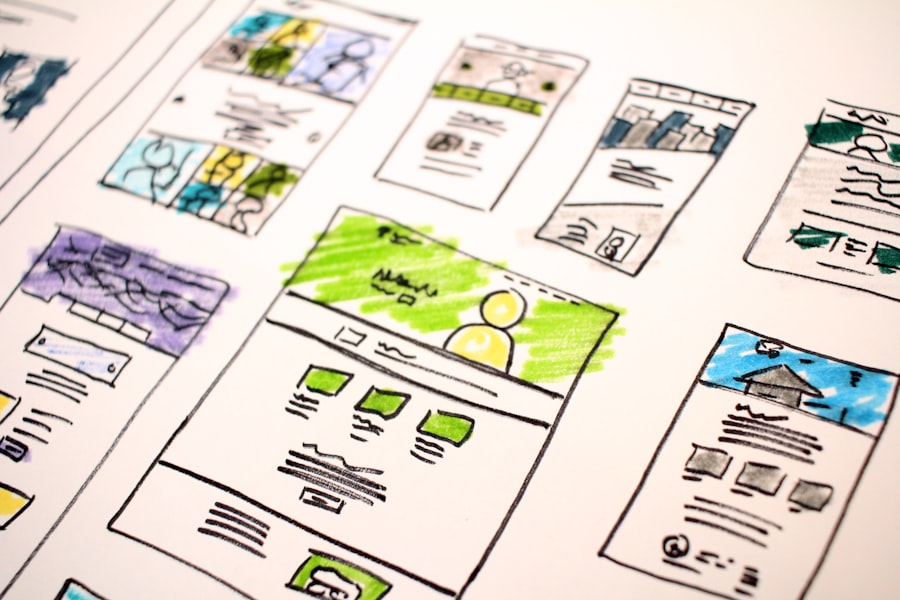
Your website isn’t just a brochure; it’s an interactive tool. Design choices should prioritize ease of use for your visitors and visibility for search engines.
Focusing on User-Friendly Design (UX/UI)
A positive user experience keeps visitors engaged, reduces bounce rates, and increases conversions.
- Responsive Design (Mobile-First): This is non-negotiable. Your website must look and function perfectly on all devices – desktops, tablets, and smartphones. Google prioritizes mobile-friendly sites.
- Intuitive Navigation: As discussed, clear and consistent menus are paramount.
- Readability: Use legible fonts, appropriate font sizes, sufficient line spacing, and good contrast between text and background. Break up large blocks of text with headings, subheadings, bullet points, and images.
- Fast Loading Times: Slow websites frustrate users and get penalized by search engines. Optimize images, minimize code, and use a reliable host.
- Clear Calls to Action (CTAs): Make it obvious what you want visitors to do next. Use contrasting colors and prominent placement.
- Accessibility: Design your website to be usable by people with disabilities. This includes features like alt text for images, keyboard navigation, and good color contrast.
- Consistency: Maintain consistent branding (colors, fonts, logo) and design elements throughout your site.
Implementing Basic Search Engine Optimization (SEO)
Getting found online is critical. While comprehensive SEO is an ongoing process, some foundational elements should be baked into your website planning.
- Keyword Research: Identify the words and phrases your target audience uses to search for your products or services. Use these naturally throughout your content, page titles, and meta descriptions.
- On-Page SEO:
- Page Titles (Title Tags): The most important on-page SEO element. Each page needs a unique, descriptive title that includes your primary keyword.
- Meta Descriptions: A brief summary of your page’s content. While not a direct ranking factor, a compelling meta description encourages clicks from search results.
- Header Tags (H1, H2, H3): Structure your content with headings. Your H1 should be your main topic, and H2s and H3s organize subtopics. Include keywords where appropriate.
- Image Alt Text: Describe your images for visually impaired users and search engines. Include keywords if relevant.
- URL Structure: Keep your URLs short, descriptive, and keyword-rich (e.g.,
yourbusiness.com/services/web-designinstead ofyourbusiness.com/?p=123). - Technical SEO:
- XML Sitemap: A map of your website that helps search engines crawl and index your pages.
- Robots.txt File: Tells search engine crawlers which parts of your site they can or cannot access.
- Schema Markup: Structured data that helps search engines understand the content on your pages more deeply, potentially leading to rich snippets in search results.
- Local SEO: If your business serves a specific geographic area, optimize for local searches. This includes having your Name, Address, and Phone number (NAP) consistent across your website and other online listings (Google My Business).
When creating a comprehensive website planning guide for small business owners, it’s essential to consider various factors that can impact the long-term success of their online presence. One interesting aspect to explore is the potential resale value of domain names, which can significantly influence a business’s digital strategy. For insights into this topic, you can read about the investment trends and predictions for 2025 in this informative article on the resale value of PK domains. Understanding these trends can help small business owners make informed decisions when selecting their domain names.
Launching, Testing, and Maintaining Your Website
| Section | Metrics |
|---|---|
| 1. Understanding Your Audience | Number of target audience segments identified |
| 2. Setting Goals | Number of specific website goals defined |
| 3. Content Planning | Number of pages planned for the website |
| 4. Design and Layout | Number of design concepts considered |
| 5. SEO Strategy | Number of keywords researched |
| 6. Budget and Timeline | Estimated budget and timeline for website development |
Building your website is just the beginning. A successful online presence requires continuous effort, monitoring, and adaptation.
Thorough Pre-Launch Testing
Never launch a website without rigorous testing. This is your last chance to catch errors and ensure a smooth user experience.
- Functionality Testing:
- Test all links (internal and external) to ensure they work.
- Submit all forms (contact, newsletter, checkout) to confirm they send correctly.
- Test payment gateways if you have an e-commerce site.
- Verify all interactive elements (buttons, sliders, pop-ups).
- Cross-Browser Compatibility: Check your site on different browsers (Chrome, Firefox, Safari, Edge) to ensure consistent appearance and functionality.
- Mobile Responsiveness: Test on various devices and screen sizes to confirm optimal display and usability.
- Content Review: Proofread all text for typos, grammatical errors, and factual inaccuracies. Ensure all images are high-resolution and properly attributed.
- Speed Test: Use tools like Google PageSpeed Insights or GTmetrix to identify and fix any performance bottlenecks.
- Security Scan: Check for any vulnerabilities before launch.
Post-Launch Monitoring and Maintenance
Your website is a living entity. It needs care and attention to remain effective.
- Website Analytics Review: Regularly check Google Analytics (or your chosen analytics platform) to understand traffic patterns, popular pages, bounce rates, and conversion rates. Use this data to identify areas for improvement.
- Security Updates: Keep your CMS, plugins, and themes updated to patch security vulnerabilities. This is especially critical for WordPress.
- Backups: Implement a regular backup schedule for your entire website. If something goes wrong, you’ll be able to restore it quickly.
- Content Updates: Keep your blog, news section, and product/service descriptions fresh and relevant. Outdated content can deter visitors and harm your SEO.
- Broken Link Checks: Periodically check for broken links and fix them to maintain a good user experience and SEO.
- Performance Monitoring: Continue to monitor your website’s speed and overall performance.
- User Feedback: Encourage feedback from your customers and act on it. What are they looking for? What could be improved?
By following this comprehensive website planning guide, you’ll be well-equipped to build a powerful online presence that effectively serves your small business, attracts your ideal customers, and helps you achieve your entrepreneurial goals. Remember, your website is an investment in your business’s future – plan it wisely.
FAQs
What is a website planning guide for small business owners?
A website planning guide for small business owners is a comprehensive resource that outlines the necessary steps and considerations for creating a successful website for a small business. It covers aspects such as goal setting, target audience identification, content planning, design considerations, and technical requirements.
Why is a website planning guide important for small business owners?
A website planning guide is important for small business owners because it helps them to strategically plan and execute their website development process. It ensures that the website aligns with the business goals, effectively communicates with the target audience, and meets technical and design standards.
What are the key components of a website planning guide for small business owners?
Key components of a website planning guide for small business owners include defining business goals, identifying target audience, creating a content strategy, planning website structure and navigation, selecting a suitable design and layout, and considering technical requirements such as hosting and domain registration.
How can small business owners use a website planning guide to improve their online presence?
Small business owners can use a website planning guide to improve their online presence by following the step-by-step instructions and recommendations provided in the guide. By carefully planning and executing their website development process, they can create a professional and effective online presence that attracts and engages their target audience.
Where can small business owners find a website planning guide?
Small business owners can find website planning guides through various sources such as online articles, blogs, e-books, and resources provided by web development agencies or marketing professionals. Additionally, there are specific website planning templates and tools available for purchase or free download online.









Add comment