

You’re on the cusp of something great. You’ve poured your heart, soul, and countless late nights into your startup, and your innovative idea is finally ready to launch. You’ve got a killer product, a compelling marketing strategy, and a team that’s brimming with enthusiasm. But as you prepare to unleash your creation upon the world, a critical question looms large: how will you ensure your website or application can handle the inevitable influx of users? This is where the ultimate startup guide to high-traffic dedicated servers comes into play.
Forget shared hosting, where you’re crammed onto a server with dozens of other websites, sharing resources and praying no one else’s traffic surge crashes your party. You’ve outgrown that. For a startup poised for growth, high-traffic dedicated servers aren’t a luxury; they’re a necessity. They represent a commitment to delivering a seamless, responsive experience for every single visitor, no matter how many descend upon your digital doorstep. This guide is your roadmap to understanding, selecting, and leveraging dedicated servers to power your startup’s meteoric rise.
Before you can harness their power, you need to understand what makes dedicated servers so special. They are, quite literally, all yours. Unlike shared hosting or even virtual private servers (VPS), a dedicated server is an entire physical machine rented exclusively to you. This means you have complete control over its resources – CPU, RAM, storage, and bandwidth – and you’re not contending with noisy neighbours for a slice of the pie.
The Foundations: Hardware and Resources
At its core, a dedicated server is a robust piece of hardware. Think of it as your own private supercomputer, housed in a secure data center.
CPU: The Brains of the Operation
The Central Processing Unit (CPU) is the engine that drives your server. For high-traffic environments, you’ll want a CPU with a high clock speed and multiple cores. This allows your server to process requests quickly and efficiently, handling multiple tasks concurrently without breaking a sweat. Imagine a busy restaurant; a CPU is like the head chef. The more efficient and capable the chef, the faster orders are fulfilled, and the happier the customers.
RAM: The Workspace of Your Server
Random Access Memory (RAM) is your server’s short-term memory. It’s where actively running applications and data are stored for quick access. For high-traffic websites, ample RAM is crucial to prevent slowdowns and crashes. When too many users are accessing your site simultaneously, they’re all vying for a spot in that workspace. Insufficient RAM forces the server to constantly swap data between RAM and slower storage, leading to a sluggish user experience. Think of it as a desk; the bigger your desk, the more papers you can have out and easily access.
Storage: The Vault of Your Data
Storage is where your website files, databases, and operating system reside. For high-traffic sites, you’ll want fast storage to ensure quick loading times and efficient data retrieval.
SSD vs. HDD: A Crucial Distinction
Solid State Drives (SSDs) are significantly faster than traditional Hard Disk Drives (HDDs). They have no moving parts, allowing for near-instantaneous data access. This speed translates directly to faster page load times for your users, a critical factor in user retention and search engine rankings. While HDDs offer higher capacities at a lower cost, for a high-traffic startup, the performance benefits of SSDs are almost always worth the investment.
Bandwidth: The Information Superhighway
Bandwidth dictates how much data can be transferred between your server and your users over a period of time. For a website expecting a lot of traffic, you need substantial bandwidth to accommodate the constant flow of information. Without enough bandwidth, your site will feel like a traffic jam on a narrow road, with data packets getting stuck and users experiencing frustrating delays.
The Pillars of Control: Why Dedicated is King
The exclusivity of a dedicated server provides benefits that shared environments simply cannot match.
Unrivaled Performance: No Shared Struggles
This is the core advantage. With a dedicated server, all the processing power, memory, and network resources are yours and yours alone. This translates to significantly faster loading times, smoother application performance, and the ability to handle sudden traffic spikes without impacting your users. Imagine your website as a shop. On shared hosting, it’s like sharing a stall with many other vendors, all vying for customer attention and space. On a dedicated server, it’s your own flagship store, with ample room and resources for every shopper.
Enhanced Security: Your Fortress Online
You have complete control over your server’s security configurations. This means you can implement custom firewalls, intrusion detection systems, and other security measures tailored to your specific needs. You’re not exposed to vulnerabilities introduced by other users on a shared platform. Building a secure online presence is paramount for any startup, and a dedicated server gives you the keys to your own digital fortress.
Complete Customization: Tailored to Your Vision
You can install any operating system you want, configure software precisely to your liking, and optimize your environment for your specific applications. This level of flexibility is invaluable for startups with unique technical requirements or ambitious growth plans. You’re not limited by the pre-configured setups of shared hosting.
Scalability Ready: Growing with Your Ambitions
While a dedicated server offers immense power out of the box, it also provides a foundation for future scaling. As your startup grows and your traffic continues to increase, you can often upgrade your existing dedicated server with more RAM, faster CPUs, or additional storage, or migrate to a more powerful dedicated solution without a complete overhaul.
For those looking to optimize their website’s performance alongside utilizing dedicated servers for high traffic, a related article that delves into essential metrics is “Mastering Core Web Vitals: The New Key to Google Rankings.” This article provides valuable insights on how to enhance user experience and improve search engine rankings by focusing on core web vitals. You can read it here: Mastering Core Web Vitals: The New Key to Google Rankings.
When Your Startup Demands More: Identifying the Need for a Dedicated Server
So, how do you know when it’s time to ditch the shared plan and embrace the power of dedicated hosting? It’s not just about the number of visitors; it’s about the impact of those visitors and your growth trajectory.
The Warning Signs: Indicators of Overwhelm
Recognizing the symptoms of under-resourced hosting is key to proactive decision-making.
Slow Loading Times: The Silent Killer of Conversions
Are your web pages taking longer and longer to load? Are users complaining about the lag? Slow loading times are a direct consequence of insufficient server resources, and they are a major deterrent for potential customers. A study by Google found that if a page takes more than 3 seconds to load, nearly half of users will abandon the site.
3.1. Bounce Rate Escalation: A direct correlation exists between slow loading times and a rising bounce rate. Visitors, encountering frustrating delays, will simply click away, seeking faster alternatives.
3.2. Conversion Rate Plunge: Every second a user waits for your site to load is a lost opportunity. This directly impacts your conversion rates, whether you’re selling products, gathering leads, or encouraging sign-ups.
Frequent Downtime and Unreliability: Dropping the Ball
Is your website experiencing more and more unexplained outages? Are you constantly worried about your site being unavailable? Unreliable hosting is unacceptable for a serious startup. Downtime means lost revenue, damaged reputation, and frustrated users who will quickly move on.
3.3. Revenue Leakage: Every minute your website is down is a direct loss of potential sales or business opportunities.
3.4. Reputational Damage: A website that is frequently offline or unstable erodes trust and brands your startup as unprofessional and unreliable. Potential clients or customers will hesitate to engage with a business that struggles with basic online functionality.
3.5. SEO Penalties: Search engines like Google penalize websites with high downtime, impacting your search rankings and making it harder for new users to discover you.
Unsustainable Resource Usage: Hitting the Ceiling
Your hosting provider might be sending you alerts about exceeding your allocated CPU, RAM, or bandwidth limits. While some overages are tolerable, consistent and significant breaches signal that your current hosting plan is no longer adequate.
3.6. Throttling and Performance Degradation: When you exceed resource limits on shared hosting, your performance may be throttled by the provider, even if your site isn’t experiencing a massive traffic spike.
3.7. Unexpected Costs: Some hosting providers charge hefty fees for exceeding resource allocations, which can derail your budget.
The Growth Predictors: Looking Ahead
It’s not just about current problems; it’s about anticipating future needs.
Anticipated Traffic Surges: The Buzz is Coming
Are you planning a major marketing campaign, a product launch, or anticipating media attention? These events can lead to exponential increases in traffic. If you’re not prepared, these surges will overwhelm your current hosting infrastructure, leading to the problems mentioned above.
3.8. Pre-Launch Preparedness: Before any major event that you expect to drive significant traffic, proactively upgrade your hosting.
3.9. Marketing Campaign Leverage: Ensure your hosting can handle the amplified traffic your marketing efforts are designed to generate, maximizing your ROI.
Complex Applications and Databases: More Demanding Needs
If your startup relies on resource-intensive applications, large databases, or custom software that requires specific server configurations, a dedicated server offers the power and flexibility you need.
3.10. E-commerce Platform Demands: Online stores, with their complex product catalogs, user accounts, and transaction processing, require robust and reliable hosting.
3.11. SaaS Applications: Software-as-a-Service (SaaS) platforms, often built with dynamic functionalities and large user bases, benefit immensely from the dedicated resources and control offered by dedicated servers.
Security and Compliance Requirements: Non-Negotiable Standards
Certain industries have strict security and compliance regulations (e.g., HIPAA for healthcare, PCI DSS for payment processing). Dedicated servers provide the highest level of control to meet these stringent requirements.
3.12. Data Sensitivity: If your startup handles sensitive user data, a dedicated server offers a more secure environment for protection against breaches.
3.13. Regulatory Adherence: Ensure your hosting environment meets all necessary compliance standards for your industry.
Navigating the Options: Choosing Your Dedicated Server Provider

The dedicated server market is vast and varied. Making the right choice requires careful consideration of your needs and the provider’s offerings.
Key Features to Scrutinize: What to Look For
Don’t just pick the cheapest option. Investigate the details.
Uptime Guarantees: The Promise of Availability
Reputable providers offer uptime guarantees, typically 99.9% or higher. This is a crucial metric indicating how reliably their infrastructure will keep your server online.
4.1. SLA Agreements: Understand the Service Level Agreement (SLA). What constitutes downtime, and what compensation is offered if the guarantee isn’t met?
Bandwidth and Network Quality: The Connectivity Factor
Inquire about the provider’s network infrastructure. Do they have multiple network connections to ensure redundancy and high speeds? What are their bandwidth offerings, and are there any hidden fees for exceeding caps?
4.2. Network Redundancy: A provider with multiple network providers and redundant connections is less susceptible to single points of failure.
4.3. Peering Arrangements: Understand the provider’s peering arrangements. This can significantly impact the speed and latency of your users’ connections to your server.
Support Levels: Your Lifeline in a Crisis
For a startup, responsive and knowledgeable technical support is non-negotiable. What kind of support do they offer? Is it 24/7? What are their response times?
4.4. Managed vs. Unmanaged: Decide if you need a managed server (where the provider handles server maintenance, security, and updates) or an unmanaged server (where you are responsible for all aspects of server administration). For most startups, managed dedicated servers offer a better balance of control and convenience.
4.5. Proactive Monitoring: Does the provider offer proactive monitoring to identify and resolve potential issues before they impact your site?
Hardware Options and Customization: Building Your Ideal Machine
Can you choose the specific hardware components (CPU, RAM, storage) that best suit your needs? Do they offer options for RAID configurations for data redundancy and performance?
4.6. Scalability within the Provider: While you’re getting a dedicated server now, consider if the provider offers options to upgrade your current server or migrate to more powerful configurations as your needs evolve.
Data Center Location and Security: Physical Safeguards
Where are their data centers located? Proximity to your target audience can improve loading speeds. What physical security measures are in place (e.g., surveillance, access control, fire suppression)?
4.7. Geographic Diversity: For critical applications, consider providers with multiple geographically dispersed data centers to ensure business continuity.
Pricing and Contracts: The Financial Aspect
Understand the pricing structure. Are there setup fees? What is the contract term? Are there any hidden costs?
4.7.1. Contract Flexibility: For startups in a rapidly evolving phase, consider providers with more flexible contract terms to avoid being locked into a solution that no longer fits.
Types of Dedicated Servers: Tailoring to Your Needs
Not all dedicated servers are created equal. Your choice will depend on your technical expertise and the level of control you desire.
Unmanaged Dedicated Servers: For the Experts
With an unmanaged dedicated server, you are the system administrator. You are responsible for installing and configuring the operating system, managing software, security, backups, and all other aspects of server maintenance. This offers the ultimate control and can be more cost-effective if you have a skilled IT team.
4.8. DIY Approach: Requires significant technical expertise and time commitment.
4.9. Cost Savings Potential: Can be cheaper if you have the resources to manage it yourself.
Managed Dedicated Servers: The Convenient Powerhouse
A managed dedicated server offers a balance of power and convenience. The hosting provider takes care of many of the administrative tasks, such as operating system updates, security patching, server monitoring, and basic troubleshooting. This frees up your team to focus on growing your business.
4.10. Reduced Administrative Burden: Ideal for startups that lack dedicated IT staff or want to optimize their team’s focus.
4.11. Expert Management: Benefits from the provider’s expertise in server administration and security.
Cloud-Based Dedicated Servers: The Best of Both Worlds?
This is a hybrid approach, offering the dedicated resources of a physical server within a cloud computing environment. This can provide enhanced scalability, flexibility, and resilience compared to traditional dedicated servers. You get the isolation of a dedicated server with the dynamic resource allocation and infrastructure of the cloud.
4.12. Scalability and Elasticity: The ability to scale resources up or down rapidly as needed.
4.13. High Availability: Often benefits from the cloud provider’s robust infrastructure for uptime and redundancy.
Setting Sail: Migrating to and Managing Your Dedicated Server
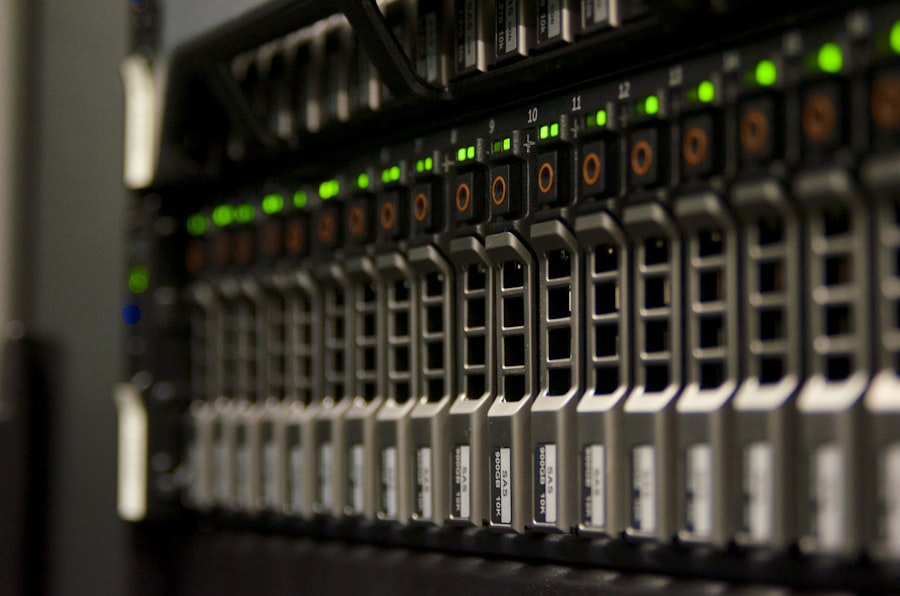
The transition to a dedicated server and its ongoing management are crucial steps. Careful planning and execution are key to a smooth experience.
The Migration Marathon: A Step-by-Step Approach
A well-executed migration minimizes disruption and ensures data integrity.
Planning and Preparation: Map Your Journey
Before you even think about moving data, create a comprehensive migration plan. Document your current infrastructure, identify critical data and applications, and define the rollback strategy in case of issues.
5.1. Inventory All Assets: Catalog all your website files, databases, applications, and configurations.
5.2. Define Downtime Window: Determine the acceptable downtime for the migration. Communicate this to your team and stakeholders.
5.3. Backup, Backup, Backup: This cannot be stressed enough. Perform multiple full backups of your entire system before starting the migration.
Data Transfer and Synchronization: Moving the Goods
This is where you physically move your website files and databases to the new dedicated server.
5.4. Choose the Right Tools: Utilize tools like rsync, FTP, or database dump utilities for efficient data transfer.
5.5. Staged Migration: For large websites, consider a staged migration where you gradually move content to minimize the impact of a single, large transfer.
5.6. Database Synchronization: Ensure your databases are synchronized to prevent data loss during the transition.
Testing and Verification: The Quality Assurance Check
Once the data is on the new server, thorough testing is paramount.
5.7. Pre-Live Testing: Access the website on the new server using its IP address or hosts file modifications to test functionality without affecting live users.
5.8. Performance Benchmarking: Run performance tests to ensure the new server is meeting or exceeding your expectations.
5.9. Functionality Checks: Test all critical features, forms, payment gateways, and user interactions.
The Grand Opening: Going Live
After successful testing, it’s time to point your domain to the new server.
5.10. DNS Propagation: Update your domain’s DNS records to point to your new dedicated server’s IP address. Be aware that DNS propagation can take some time.
5.11. Post-Launch Monitoring: Closely monitor your website for any issues immediately after going live.
Mastering the Controls: Ongoing Server Management
A dedicated server isn’t a set-it-and-forget-it solution. Ongoing management is essential for optimal performance and security.
Security Best Practices: Your Digital Guardian
Security is an ongoing process, not a one-time fix.
5.12. Firewall Configuration: Implement and regularly review your firewall rules to control network traffic.
5.13. Regular Software Updates and Patching: Keep your operating system, web server software, and all other applications up-to-date to patch vulnerabilities.
5.14. Intrusion Detection/Prevention Systems (IDS/IPS): Consider deploying IDS/IPS to actively monitor for and block malicious activity.
5.15. Regular Security Audits: Conduct periodic security audits to identify and address potential weaknesses.
Performance Optimization: Keeping Things Zippy
Continuously monitor and fine-tune your server’s performance.
5.16. Load Balancing: If you have multiple dedicated servers or are experiencing extreme traffic, consider load balancing to distribute traffic efficiently.
5.17. Caching Strategies: Implement effective caching mechanisms (e.g., browser caching, server-side caching) to serve content faster.
5.18. Database Optimization: Regularly optimize your databases for speed and efficiency.
5.19. Resource Monitoring: Keep a close eye on CPU, RAM, and disk usage to identify potential bottlenecks.
Backups and Disaster Recovery: Your Safety Net
Regular, reliable backups are your insurance policy against data loss.
5.20. Automated Backups: Schedule automated daily or even hourly backups.
5.21. Off-Site Storage: Store your backups in a geographically separate location to protect against data loss in case of a disaster at your primary data center.
5.22. Disaster Recovery Plan: Have a clear and tested disaster recovery plan in place for how you will restore your services in the event of a major outage.
For those looking to optimize their website’s performance, understanding dedicated servers is crucial, especially when handling high traffic. A related article that delves into another aspect of web hosting is available, providing insights into reseller hosting and its functionality. This can be particularly beneficial for entrepreneurs aiming to expand their service offerings. You can read more about it in this informative piece on reseller hosting.
The Future-Proof Foundation: Scaling Your Startup with Dedicated Servers
| Metrics | Value |
|---|---|
| Server Type | Dedicated |
| Traffic Volume | High |
| Bandwidth | 10 Gbps |
| RAM | 32 GB |
| Storage | 1 TB SSD |
| Processor | Intel Xeon E5 |
Your startup is built for growth, and your hosting infrastructure must be able to grow with you. Dedicated servers offer a powerful and adaptable solution for this journey.
The Scalability Spectrum: Growing with Your Success
As your user base expands and your application becomes more sophisticated, you’ll need to scale your resources.
Vertical Scaling: Enhancing Your Current Powerhouse
This involves upgrading the components of your existing dedicated server.
6.1. Adding More RAM: The most common and often most impactful upgrade for performance.
6.2. Upgrading the CPU: For CPU-intensive applications, a more powerful processor can make a significant difference.
6.3. Increasing Storage Capacity or Speed: If your data needs are growing, adding more storage or upgrading to faster drives (e.g., NVMe SSDs) is essential.
Horizontal Scaling: Expanding Your Infrastructure
This involves adding more dedicated servers to your setup.
6.4. Load Balancing: As mentioned, load balancers distribute traffic across multiple servers, ensuring no single server is overwhelmed.
6.5. Database Clustering: For highly demanding databases, clustering multiple database servers can provide increased capacity and fault tolerance.
6.6. Microservices Architecture: For complex applications, breaking them down into smaller, independent microservices that can be deployed on separate dedicated servers offers immense flexibility and scalability.
Beyond Servers: The Ecosystem of High-Traffic Solutions
While dedicated servers are your core infrastructure, consider other elements that contribute to a high-traffic strategy.
6.7. Content Delivery Networks (CDNs): CDNs cache your static content (images, CSS, JavaScript) on servers distributed globally, delivering it to users from the closest server, drastically reducing load times.
6.8. Database Optimization Tools: Investing in specialized database management and optimization tools can unlock significant performance gains.
6.9. Application Performance Monitoring (APM): APM tools provide deep insights into your application’s performance, helping you identify and resolve issues quickly.
6.10. DevOps Practices: Embracing DevOps methodologies can streamline your development and deployment processes, making it easier to manage a complex, high-traffic infrastructure.
By embracing dedicated servers from the outset, you are not just purchasing hosting; you are investing in the future scalability, performance, and reliability of your startup. This guide has provided you with the foundational knowledge to make informed decisions, navigate the complexities of dedicated hosting, and ultimately, ensure that as your startup soars, your online presence is ready to handle every single one of those soaring users. Go forth and build something amazing, knowing your digital foundation is solid.
FAQs
What is a dedicated server?
A dedicated server is a type of web hosting where a client leases an entire server for their exclusive use. This means that the client has full control over the server’s resources and can customize it to meet their specific needs.
When is it recommended to use a dedicated server for high traffic websites?
Dedicated servers are recommended for high traffic websites that require a high level of performance, security, and customization. They are ideal for websites with large volumes of traffic, resource-intensive applications, and e-commerce platforms.
What are the benefits of using a dedicated server for high traffic websites?
Some benefits of using a dedicated server for high traffic websites include improved performance, better security, full control over server resources, customization options, and the ability to handle large volumes of traffic without experiencing slowdowns or downtime.
What are the key considerations when choosing a dedicated server for high traffic websites?
Key considerations when choosing a dedicated server for high traffic websites include the server’s hardware specifications, bandwidth and network connectivity, security features, support and maintenance options, and scalability to accommodate future growth.
How can I optimize a dedicated server for high traffic websites?
To optimize a dedicated server for high traffic websites, consider implementing caching mechanisms, content delivery networks (CDNs), load balancing, and regular performance monitoring and optimization. Additionally, ensure that the server’s hardware and software are regularly updated and maintained for optimal performance.









Add comment