

You’re building a website, or perhaps you’ve already launched one. You’ve poured effort into its design, content, and functionality. You envision it as a gleaming digital storefront, or perhaps a community hub, or even a potent lead generation tool. However, a crucial element often overlooked until it becomes a significant bottleneck is your website’s loading speed. This isn’t about aspirational marketing speak; it’s about tangible performance that directly impacts your success. Your choice of web hosting plays an instrumental role in this performance. This article will guide you through understanding why superior hosting is paramount for a fast-loading website and how to make informed decisions to achieve it.
Before delving into hosting specifics, it’s essential to grasp what contributes to your website’s loading speed. This isn’t a monolithic metric; it’s a composite of various factors, each of which is influenced by your hosting environment.
What is Website Loading Speed?
Website loading speed refers to the time it takes for your website’s content to be fully rendered and interactive for a visitor in their web browser. This includes everything from the initial HTML download to the loading of images, scripts, stylesheets, and any other assets that constitute your web pages. You might measure this using metrics like First Contentful Paint (FCP), Largest Contentful Paint (LCP), and Time to Interactive (TTI).
Why Does Loading Speed Matter to Your Audience?
Your visitors have limited patience. In today’s digital landscape, attention spans are short, and competition for clicks and engagement is fierce. A slow website will quickly lead to frustration and abandonment.
User Experience and Engagement
A fast website provides a smooth and seamless user experience. When pages load quickly, visitors are more likely to explore your content, interact with your features, and ultimately achieve their goals on your site. This translates to lower bounce rates and increased time spent on your site.
Conversion Rates and Business Objectives
If your website is designed to generate leads, drive sales, or encourage sign-ups, every second of loading time is a potential lost opportunity. Studies consistently demonstrate a strong correlation between website speed and conversion rates. A faster site means more completed transactions, more inquiries, and a healthier bottom line.
Search Engine Optimization (SEO)
Search engines like Google consider website speed as a ranking factor. A faster website signals a better user experience, which is a priority for search algorithms. Improving your loading speed can directly contribute to higher search engine rankings, making your site more discoverable by potential visitors.
Technical Components Affecting Load Time
Several technical facets influence how quickly your website loads. Your hosting solution has a direct impact on many of these.
Server Response Time
This is the initial delay between a visitor’s browser requesting a web page and the web server beginning to send data back. A slow server response time indicates that the server is struggling to process the request, which can be due to underpowered hardware, inefficient software, or network congestion.
File Sizes and Optimization
The size of your website’s files, particularly images and scripts, significantly affects download times. While not solely a hosting concern, the server’s capability to deliver these files efficiently plays a role. Under-optimized files will take longer to transmit over the network.
Browser Rendering
Once the files are downloaded, the visitor’s browser needs to process and display them. Complex code, large stylesheets, and numerous scripts can slow down this rendering process. The server’s processing power can indirectly influence the complexity of the code it sends.
Network Latency
This refers to the delay in data transmission between the visitor’s device and the web server. This is influenced by geographical distance, the number of network hops, and the overall quality of the internet infrastructure between the two points. While you can’t control your visitor’s internet connection, you can minimize the distance and improve the efficiency of the path to your server.
Improving website loading speed is crucial for enhancing user experience and boosting SEO rankings, and one of the key factors influencing speed is the choice of web hosting. To further complement your efforts in optimizing your website, it’s also essential to consider the security features offered by your hosting provider. For insights on this topic, check out the article on the top security features your web host should offer in 2023 at this link. This resource can help you ensure that your website is not only fast but also secure, providing a comprehensive approach to website management.
The Crucial Role of Hosting in Website Speed
Your web hosting is the foundation upon which your website is built and delivered to the world. It’s not merely a place to store your files; it’s the engine that powers your site’s performance.
Server Hardware and Performance
The physical server your website resides on is a critical determinant of its speed. This encompasses the processing power (CPU), memory (RAM), and storage (disk type and speed).
CPU and RAM Allocation
Shared hosting plans, for instance, distribute server resources among many users. This means your website’s performance can be negatively impacted by neighboring sites that consume excessive CPU or RAM. Conversely, superior hosting solutions, such as Virtual Private Servers (VPS) or dedicated servers, provide you with dedicated or significantly larger allocations of these resources, ensuring your site has the power it needs without being throttled by others.
Disk Input/Output (I/O) Operations
The speed at which your server can read and write data from its storage is also vital. Traditional Hard Disk Drives (HDDs) are significantly slower than Solid State Drives (SSDs). Websites that are database-intensive or handle a large volume of traffic will benefit immensely from the rapid access and transfer speeds offered by SSD-powered hosting.
Network Infrastructure and Bandwidth
The network that connects your web server to the internet is another key component. This includes the server’s connectivity to the broader internet backbone and the amount of data it can transfer.
Bandwidth Capacity
Bandwidth refers to the amount of data that can be transferred between your server and visitors over a given period. Insufficient bandwidth can lead to slow loading times, particularly during periods of high traffic. Superior hosting providers invest in robust network infrastructure with ample bandwidth to handle your site’s needs without congestion.
Server Location and Content Delivery Networks (CDNs)
The geographical location of your web server relative to your target audience has a direct impact on network latency. If your audience is primarily in North America, hosting your site in Asia will introduce unnecessary delays. Utilizing Content Delivery Networks (CDNs) is a strategy that superior hosting often integrates or complements. CDNs use a network of geographically distributed servers to cache your website’s content, delivering it to visitors from the server closest to them, thereby significantly reducing latency.
Server Software and Optimization
Beyond the hardware, the software that runs on your web server also plays a role. This includes the web server software itself (e.g., Apache, Nginx), the database management system, and the operating system.
Web Server Configuration
The way your web server is configured can profoundly affect its efficiency. Optimized configurations can reduce resource consumption and speed up the delivery of web pages. Superior hosting providers often employ highly tuned server configurations, and managed hosting solutions may provide proactive optimization as part of their service.
Database Performance
For dynamic websites that rely on databases (most modern websites do), database performance is paramount. Efficient database queries, proper indexing, and optimized database software contribute to faster data retrieval. If your hosting provider uses outdated or poorly configured database systems, your site’s speed will suffer.
Exploring Superior Hosting Options for Speed
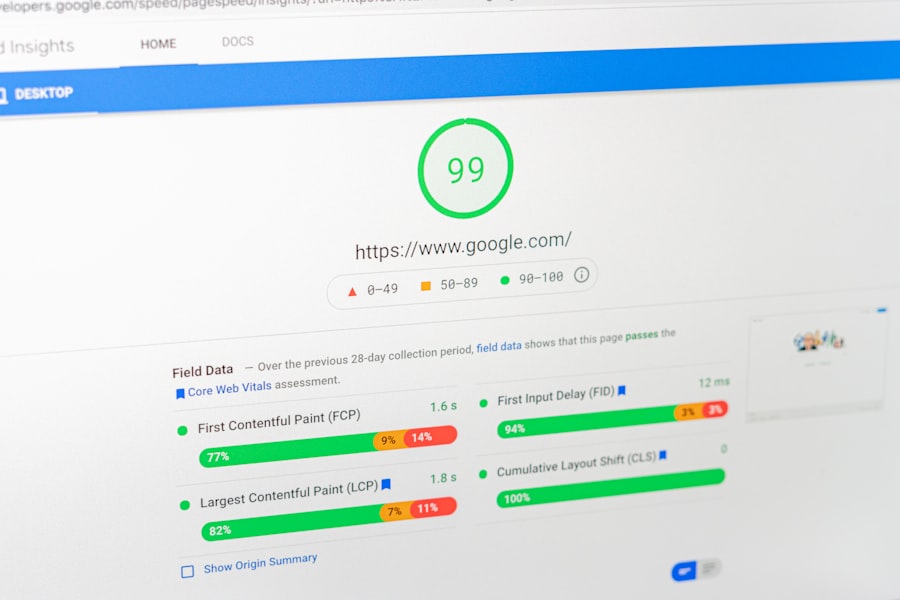
When you move beyond basic shared hosting, you unlock a world of possibilities for boosting your website’s loading speed. The “superior” in superior hosting isn’t just about marketing; it’s about dedicated resources, advanced technology, and an infrastructure built for performance.
Managed VPS Hosting
Virtual Private Servers offer a step up from shared hosting by providing you with a dedicated portion of a physical server’s resources. This means you’re not competing with other users for CPU, RAM, and disk I/O.
Dedicated Resources for Consistent Performance
With a VPS, you are guaranteed a specific amount of RAM and CPU power. This eliminates the “noisy neighbor” effect common in shared hosting and ensures your website’s performance remains consistent, even during traffic spikes.
Enhanced Control and Customization
While still a virtual environment, VPS hosting offers greater control over your server environment. You can often install custom software, configure specific server settings, and optimize your setup for your website’s unique needs, all of which can contribute to speed improvements.
Scalability for Growth
As your website grows and traffic increases, a VPS can typically be upgraded relatively easily. This allows you to scale your resources to meet demand without experiencing significant performance degradation.
Cloud Hosting
Cloud hosting utilizes a network of interconnected servers that work together to host your website. This architecture offers significant advantages in terms of scalability, reliability, and, importantly, speed.
Distributed Infrastructure for High Availability
Cloud hosting distributes your website across multiple servers. If one server experiences an issue, others can seamlessly take over, ensuring your site remains accessible and performs optimally. This distributed nature also enables faster delivery of content by serving it from geographically diverse locations.
On-Demand Resource Allocation
One of the key benefits of cloud hosting is its ability to scale resources up or down automatically based on demand. This means your website can handle sudden traffic surges without compromising performance, and you only pay for the resources you actually use.
Load Balancing for Optimal Traffic Distribution
Cloud platforms often incorporate sophisticated load balancing mechanisms. These systems intelligently distribute incoming traffic across multiple servers, preventing any single server from becoming overloaded and ensuring consistent, fast loading times for all visitors.
Dedicated Server Hosting
For the most demanding websites, a dedicated server offers the ultimate in performance and control. You have an entire physical server exclusively for your website.
Exclusive Use of Server Resources
With a dedicated server, all the CPU, RAM, storage, and bandwidth are yours alone. This eliminates any possibility of performance being impacted by other users, providing the most consistent and highest possible speed for your website.
Complete Control and Customization
A dedicated server gives you root access and complete control over the server environment. You can install any software, configure every setting, and fine-tune the entire system for maximum performance, tailored precisely to your website’s requirements.
Potential for Advanced Hardware and Network Configurations
Superior hosting providers offering dedicated servers often provide options for high-performance hardware, including enterprise-grade SSDs, ample RAM, and robust network connections to ensure the fastest possible data delivery.
Key Features of Superior Hosting for Speed Optimization

Beyond the general categories of hosting, there are specific features and technologies that distinguish superior hosting providers and directly contribute to a faster website.
SSD Storage
Solid State Drives (SSDs) have revolutionized data storage performance. Unlike traditional Hard Disk Drives (HDDs) that use spinning platters, SSDs use flash memory, offering significantly faster read and write speeds.
Rapid Data Access for Dynamic Content
For websites that frequently access databases or load numerous small files, SSDs dramatically reduce the time it takes to retrieve this data. This translates to snappier page loads, especially for content-rich or e-commerce sites.
Reduced Latency in File Retrieval
The physical movement of read/write heads in HDDs introduces latency. SSDs eliminate this mechanical delay, allowing for near-instantaneous access to your website’s files and database records.
Advanced Caching Mechanisms
Caching is a technique used to store frequently accessed data in a temporary location, making it quicker to retrieve than fetching it from the original source every time. Superior hosting often leverages multiple layers of caching.
Server-Side Caching
This involves caching entire web pages or database query results on the server itself. When a visitor requests a page that has been cached, the server can deliver it directly, bypassing the need to regenerate it from scratch. This includes technologies like Varnish Cache.
Browser Caching
This allows the visitor’s web browser to store copies of your website’s assets (images, CSS, JavaScript) locally. The next time the visitor returns to your site, their browser can load these assets from its cache instead of re-downloading them, leading to much faster subsequent page loads.
Object Caching
For dynamic websites that rely on complex data structures, object caching (e.g., using Redis or Memcached) can significantly speed up the retrieval and processing of these objects, a common bottleneck for applications built on frameworks like PHP.
Content Delivery Networks (CDNs) Integration
While not strictly a hosting feature, superior hosting providers often offer seamless integration with or have their own robust CDN solutions.
Geographically Distributed Edge Servers
CDNs consist of a global network of servers strategically placed in various locations. When a visitor accesses your website, their request is routed to the nearest CDN server, which then delivers the cached content.
Reduced Latency and Faster Delivery
By serving content from a server geographically closer to the visitor, CDNs dramatically reduce network latency and shorten the distance data needs to travel, resulting in faster loading times across the globe.
Offloading Traffic from Your Origin Server
CDNs can significantly reduce the load on your primary web server by handling a substantial portion of content delivery, freeing up your server’s resources for processing dynamic requests.
Optimized Web Server Software (e.g., Nginx)
While Apache has been a long-standing standard, Nginx is often favored in high-performance hosting environments for its efficiency in handling concurrent connections.
Efficient Handling of Concurrent Connections
Nginx is designed to handle a large number of simultaneous connections with minimal resource overhead. This is crucial for websites experiencing high traffic volumes, ensuring that new visitors don’t have to wait for existing connections to be processed.
Asynchronous Event-Driven Architecture
Nginx employs an asynchronous, event-driven architecture, which makes it exceptionally efficient at serving static content and handling requests without the need to create a new process or thread for each connection, unlike some traditional web servers.
Improving your website’s loading speed is crucial for enhancing user experience and boosting SEO rankings, and one effective way to achieve this is by choosing better hosting options. For those looking to create a successful online presence, understanding the common pitfalls in blogging can also be beneficial. You might find it helpful to read about the various challenges that beginners face in this regard by checking out this insightful article on blogging mistakes. By addressing both hosting and content strategies, you can significantly enhance your website’s performance and engagement.
Making the Right Hosting Choice for Your Website’s Speed
| Metrics | Recommendations |
|---|---|
| Server Response Time | Choose a hosting provider with fast server response times |
| Uptime Percentage | Look for hosting with high uptime guarantees |
| Bandwidth | Ensure your hosting plan offers sufficient bandwidth for your website traffic |
| Server Location | Choose a hosting provider with servers located close to your target audience |
| SSD Storage | Opt for hosting with SSD storage for faster data retrieval |
Selecting the correct hosting solution requires careful consideration of your website’s current needs and future growth.
Assess Your Website’s Requirements
Before you start comparing hosting plans, you need a clear understanding of what your website demands.
Traffic Volume and Expected Growth
Estimate the number of visitors you currently receive and anticipate for the future. A high-traffic website needs more robust infrastructure than a small personal blog.
Website Complexity and Resource Intensity
Is your website primarily static content, or does it involve complex databases, dynamic content generation, e-commerce functionality, or resource-intensive applications? The latter will require more powerful hosting.
Technical Expertise and Management Needs
Are you comfortable managing server configurations and performing maintenance, or do you prefer a managed solution where the provider handles these tasks?
Compare Hosting Providers and Plans
Once you have a clear picture of your needs, you can begin evaluating different hosting providers.
Research Provider Reputation and Uptime Guarantees
Look for providers with a proven track record of reliability and consistently high uptime. A website that is frequently offline, regardless of speed, is detrimental to your success.
Examine Resource Allocations (CPU, RAM, Bandwidth, Storage)
Carefully review the specific resources offered in each plan. Don’t be swayed solely by price; ensure the resources align with your website’s demands. Pay attention to whether they are dedicated or shared.
Investigate Included Features and Technologies
Look for providers that offer SSD storage, advanced caching mechanisms, and CDN integration. Managed VPS and cloud hosting plans often bundle these beneficial features.
Consider Managed vs. Unmanaged Hosting
This decision hinges on your technical proficiency and time commitment.
Managed Hosting: Convenience and Expertise
In a managed hosting environment, the provider takes care of server maintenance, security updates, performance optimization, and often, troubleshooting. This is ideal if you lack the technical expertise or time to manage these aspects yourself. Superior managed hosting providers will actively monitor performance and implement optimizations.
Unmanaged Hosting: Ultimate Control and Flexibility
Unmanaged hosting gives you complete control over the server environment. You are responsible for all software installations, configurations, security, and maintenance. This option is best suited for experienced users who require granular control and have the technical skills to manage a server effectively.
By understanding the intricate relationship between your hosting environment and your website’s loading speed, and by diligently evaluating your options, you can make an informed decision that lays the groundwork for a fast, responsive, and ultimately, more successful online presence. Investing in superior hosting is not an expense; it’s a strategic investment in the performance and longevity of your digital asset.
FAQs
1. Why is website loading speed important?
Website loading speed is important because it directly impacts user experience and can affect a website’s search engine ranking. Slow loading times can lead to higher bounce rates and lower conversion rates.
2. How does hosting affect website loading speed?
The quality of hosting can significantly impact website loading speed. Better hosting providers typically offer faster servers, better infrastructure, and more resources, resulting in improved website performance.
3. What are some factors to consider when choosing a hosting provider to improve website loading speed?
When choosing a hosting provider to improve website loading speed, factors to consider include server location, server response time, uptime guarantees, available resources (such as CPU, RAM, and storage), and the provider’s reputation for speed and reliability.
4. What are some techniques to optimize website loading speed with better hosting?
Some techniques to optimize website loading speed with better hosting include using content delivery networks (CDNs), enabling caching, optimizing images and other media, minimizing HTTP requests, and utilizing efficient coding practices.
5. How can website owners measure and monitor their website loading speed?
Website owners can measure and monitor their website loading speed using tools such as Google PageSpeed Insights, GTmetrix, Pingdom, and WebPageTest. These tools provide insights into various performance metrics and offer suggestions for improvement.









Add comment